
«Runtime error» появляется при запуске различных приложений, включая и видеоигр, либо в случайные моменты при работе ОС Windows. Ошибка не эксклюзивна для какой-то одной версии Windows — она возникает на всем, начиная от Windows XP и заканчивая последними сборками «десятки». В сегодняшней статье мы расскажем вам, что вызывает «Runtime error» и как от нее избавиться.
Содержание
- Причины появления «Runtime error»
- Решение ошибки «Runtime error»
- Решение №1 Ликвидация кириллицы
- Решение №2 Изменение языка программ, не поддерживающих Юникод
- Решение №3 Переустановка Visual Studio C++ и .NET Framework
- Решение №4 Удаление недавно установленных программ
- Решение №5 Восстановление системных файлов
Причины появления «Runtime error»
К сожалению, определить точную причину появления данной ошибки невозможно: пользователю необходимо перебирать доступные решения, пока одно из них не устранит проблему. Тем не менее давайте все же взглянем на список, так сказать, «подозреваемых». Вот что может вызывать появление ошибки «Runtime error»:
- отсутствующие либо поврежденные системные компоненты;
- конфликт запускаемого приложения со сторонней программой/службой;
- поврежденные файлы запускаемого приложения;
- присутствие кириллицы в расположении исполняемого файла приложения;
- «кривая» установка библиотек Visual Studio C++ и .NET Framework либо их отсутствие.
Решение ошибки «Runtime error»
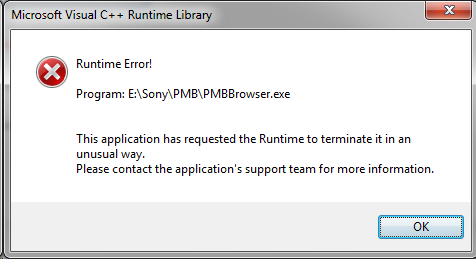
Решение №1 Ликвидация кириллицы
Ошибка «Runtime error» может возникать при запуске тех программ и игр, в расположении которых присутствуют кириллические символы. Например, на данную ошибку можно наткнуться, если запускаемое приложение находится по пути C:Users[ИМЯ АККАУНТА НА РУССКОМ]Downloads[КОРНЕВАЯ ПАПКА ПРИЛОЖЕНИЯ]. Избавьтесь от русского языка по пути к приложению и попробуйте запустить его еще раз.
Решение №2 Изменение языка программ, не поддерживающих Юникод
Появление ошибки «Runtime error» возможно в том случае, если в параметрах региональных стандартов для приложений, не поддерживающих Юникод, задан русский, а не английский язык.
- Нажмите WIN+R и выполните значение «CONTROL»;
- кликните на пункт «Изменение форматов даты, времени и чисел» в разделе «Часы и регион»;
- перейдите во вкладку «Дополнительно» в появившемся окошке «Регион»;
- нажмите на кнопку «Изменить язык системы…»;
- в ниспадающем меню выберите «Английский (США)» и сохраните внесенные изменения;
- перезагрузите ПК.
Запустите проблемное приложение, чтобы проверить наличие ошибки.
Решение №3 Переустановка Visual Studio C++ и .NET Framework
Некорректно установленные (либо отсутствующие в системе) распространяемые библиотеки Microsoft Visual Studio C++ и .NET Framework могут вызвать появление «Runtime error». Чтобы переустановить эти библиотеки, вам нужно сделать следующее:
- вызовите перед собой Панель управления, как это было показано выше;
- кликните на «Удаление программы» в разделе «Программы»;
- найдите в списке программ все версии Visual Studio C++ и удалите их;
- перейдите на официальный сайт Майкрософт и загрузите необходимые установщики VS C++;
- проделайте тоже самое с различными версиями .NET Framework на своем ПК;
- вернитесь к окошку «Программы и компоненты» и кликните на пункт «Включение или отключение компонентов Windows»;
- убедитесь, что возле всех версий .NET Framework стоят галочки;
- закройте все открытые окна и перезагрузите ПК.
Решение №4 Удаление недавно установленных программ
Определенные программы могут входить в конфликты с приложениями на компьютере. Ошибка «Runtime error» начала появляться практически сразу после установки какой-то программы или игры? Удалите ее, перезагрузите ПК и попробуйте запустить нужное вам приложение еще раз. Возможно, на сей раз никакой ошибки не появится. Заняться удалением программ можно в «Программы и компоненты» (показано выше ↑).
Решение №5 Восстановление системных файлов
Поврежденные системные файлы — потенциальная причина за появлением ошибки «Runtime error». Благо, в Windows присутствует специальная утилита, задача которой — это восстановление системных файлов. Чтобы пустить эту утилиту в работу, вам нужно сделать на своем ПК следующее:
- кликните ПКМ на меню Пуск и выберите пункт «Командная строка (администратор)» (PowerShell тоже подойдет);
- пропишите в консоли команду «SFC /SCANNOW» и нажмите ENTER;
- дождитесь окончания сканирования и восстановления системных файлов;
- перезагрузите компьютер.
Ошибка «Runtime error» практически наверняка исчезнет с вашего ПК, особенно если SFC удалось найти и восстановить поврежденные системные файлы.
1 2 3 4 5 6 7 8 9 10 11 12 13 14 15 16 17 18 19 20 21 22 23 24 25 26 27 28 29 30 31 32 33 34 35 36 37 38 39 40 41 42 43 44 45 46 47 48 49 50 51 52 53 54 55 56 57 58 59 60 61 62 63 64 65 66 67 68 69 70 71 72 73 74 75 76 77 78 79 80 81 82 83 84 85 86 87 88 89 90 91 92 93 94 95 96 97 98 99 100 101 102 103 104 105 106 107 108 109 110 111 112 113 114 115 116 117 118 119 120 121 122 123 124 125 126 127 128 129 130 131 132 133 134 135 136 137 138 139 140 141 142 143 144 145 146 147 148 149 150 151 152 153 154 155 156 157 158 159 160 161 162 163 164 165 166 167 168 169 170 171 172 173 174 175 176 177 178 179 180 181 182 183 184 185 186 187 188 189 190 191 192 193 194 195 196 197 198 199 200 201 202 203 204 205 206 207 208 209 210 211 212 213 214 215 216 217 218 219 220 221 222 223 224 225 226 227 228 229 230 231 232 233 234 235 236 237 238 239 240 241 242 243 244 245 246 247 248 249 250 251 252 253 254 255 256 257 258 259 260 261 262 263 264 265 266 267 268 269 270 271 272 273 274 275 276 277 278 279 280 281 282 283 284 285 286 287 288 289 290 291 292 293 294 295 296 297 298 299 300 301 302 303 304 305 306 307 308 309 310 311 312 313 314 315 316 317 318 319 320 321 322 323 324 325 326 327 328 329 330 331 332 333 334 335 336 337 338 339 340 341 342 343 344 345 346 347 348 349 350 351 352 353 354 355 356 357 358 359 360 361 362 363 364 365 366 367 368 369 370 371 372 373 374 375 376 377 378 379 380 381 382 383 384 385 386 387 388 389 390 391 392 393 394 395 396 397 398 399 400 401 402 403 404 405 406 407 408 409 410 411 412 413 414 415 416 417 418 419 420 421 422 423 424 425 426 427 428 429 430 431 432 433 434 435 436 437 438 439 440 441 442 443 444 445 446 447 448 |
unit Unit1; interface uses Windows, Messages, SysUtils, Variants, Classes, Graphics, Controls, Forms, Dialogs, Math; type TForm1 = class(TForm) procedure FormCreate(Sender: TObject); private { Private declarations } public { Public declarations } end; function outOfMapBounds(x, y:Real):Boolean; const CELL_SIZE:Integer = 32; Map : array [0..6,0..6] of Real = ( (1,1,1,1,1,1,1), (1,0,0,0,0,0,1), (1,0,1,1,0,1,1), (1,0,0,0,0,0,1), (1,0,1,0,1,0,1), (1,0,1,0,1,0,1), (1,1,1,1,1,1,1) ); var Form1: TForm1; arr1:Array[0..333,0..1] of Real = ( (-32,-0.523598775598299), (-32,-0.52207668613435), (-32,-0.520554596670402), (-32,-0.519032507206453), (-32,-0.517510417742505), (-32,-0.515988328278556), (-32,-0.514466238814608), (-32,-0.512944149350659), (-32,-0.511422059886711), (-32,-0.509899970422762), (-32,-0.508377880958814), (-32,-0.506855791494865), (-32,-0.505333702030916), (-32,-0.503811612566968), (-32,-0.502289523103019), (-32,-0.500767433639071), (-32,-0.499245344175122), (-32,-0.497723254711174), (-32,-0.496201165247225), (-32,-0.494679075783277), (-32,-0.493156986319328), (-32,-0.49163489685538), (-32,-0.490112807391431), (-32,-0.488590717927482), (-32,-0.487068628463534), (-32,-0.485546538999585), (-32,-0.484024449535637), (-32,-0.482502360071688), (-32,-0.48098027060774), (-32,-0.479458181143791), (-32,-0.477936091679843), (-32,-0.476414002215894), (-32,-0.474891912751946), (-32,-0.473369823287997), (-32,-0.471847733824048), (-32,-0.4703256443601), (-32,-0.468803554896151), (-32,-0.467281465432203), (-32,-0.465759375968254), (-32,-0.464237286504306), (-32,-0.462715197040357), (-32,-0.461193107576409), (-32,-0.45967101811246), (-32,-0.458148928648512), (-32,-0.456626839184563), (-32,-0.455104749720614), (-32,-0.453582660256666), (-32,-0.452060570792717), (-32,-0.450538481328769), (-32,-0.44901639186482), (-32,-0.447494302400872), (-32,-0.445972212936923), (-32,-0.444450123472975), (-32,-0.442928034009026), (-32,-0.441405944545078), (-32,-0.439883855081129), (-32,-0.43836176561718), (-32,-0.436839676153232), (-32,-0.435317586689283), (-32,-0.433795497225335), (-32,-0.432273407761386), (-32,-0.430751318297438), (-32,-0.429229228833489), (-32,-0.427707139369541), (-32,-0.426185049905592), (-32,-0.424662960441644), (-32,-0.423140870977695), (-32,-0.421618781513747), (-32,-0.420096692049798), (-32,-0.418574602585849), (-32,-0.417052513121901), (-32,-0.415530423657952), (-32,-0.414008334194004), (-32,-0.412486244730055), (-32,-0.410964155266107), (-32,-0.409442065802158), (-32,-0.40791997633821), (-32,-0.406397886874261), (-32,-0.404875797410313), (-32,-0.403353707946364), (-32,-0.401831618482415), (-32,-0.400309529018467), (-32,-0.398787439554518), (-32,-0.39726535009057), (-32,-0.395743260626621), (-32,-0.394221171162673), (-32,-0.392699081698724), (-32,-0.391176992234776), (-32,-0.389654902770827), (-32,-0.388132813306879), (-32,-0.38661072384293), (-32,-0.385088634378981), (-32,-0.383566544915033), (-32,-0.382044455451084), (-32,-0.380522365987136), (-32,-0.379000276523187), (-32,-0.377478187059239), (-32,-0.37595609759529), (-32,-0.374434008131342), (-32,-0.372911918667393), (-32,-0.371389829203445), (-32,-0.369867739739496), (-32,-0.368345650275547), (-32,-0.366823560811599), (-32,-0.36530147134765), (-32,-0.363779381883702), (-32,-0.362257292419753), (-32,-0.360735202955805), (-32,-0.359213113491856), (-32,-0.357691024027908), (-32,-0.356168934563959), (-32,-0.354646845100011), (-32,-0.353124755636062), (-32,-0.351602666172114), (-32,-0.350080576708165), (-32,-0.348558487244216), (-32,-0.347036397780268), (-32,-0.345514308316319), (-32,-0.343992218852371), (-32,-0.342470129388422), (-32,-0.340948039924474), (-32,-0.339425950460525), (-32,-0.337903860996577), (-32,-0.336381771532628), (-32,-0.33485968206868), (-32,-0.333337592604731), (-32,-0.331815503140782), (-32,-0.330293413676834), (-32,-0.328771324212885), (-32,-0.327249234748937), (-32,-0.325727145284988), (-32,-0.32420505582104), (-32,-0.322682966357091), (-32,-0.321160876893143), (-32,-0.319638787429194), (-32,-0.318116697965246), (-32,-0.316594608501297), (-32,-0.315072519037349), (-32,-0.3135504295734), (-32,-0.312028340109451), (-32,-0.310506250645503), (-32,-0.308984161181554), (-32,-0.307462071717606), (-32,-0.305939982253657), (-32,-0.304417892789709), (-32,-0.30289580332576), (-32,-0.301373713861812), (-32,-0.299851624397863), (-32,-0.298329534933915), (-32,-0.296807445469966), (-32,-0.295285356006017), (-32,-0.293763266542069), (-32,-0.29224117707812), (-32,-0.290719087614172), (-32,-0.289196998150223), (-32,-0.287674908686275), (-32,-0.286152819222326), (-32,-0.284630729758378), (-32,-0.283108640294429), (-32,-0.281586550830481), (-32,-0.280064461366532), (-32,-0.278542371902583), (-32,-0.277020282438635), (-32,-0.275498192974686), (-32,-0.273976103510738), (-32,-0.272454014046789), (-32,-0.270931924582841), (-32,-0.269409835118892), (-32,-0.267887745654944), (-32,-0.266365656190995), (-32,-0.264843566727047), (-32,-0.263321477263098), (-32,-0.261799387799149), (-32,-0.260277298335201), (-32,-0.258755208871252), (-32,-0.257233119407304), (-32,-0.255711029943355), (-32,-0.254188940479407), (-32,-0.252666851015458), (-32,-0.25114476155151), (-32,-0.249622672087561), (-32,-0.248100582623613), (-32,-0.246578493159664), (-32,-0.245056403695715), (-32,-0.243534314231767), (-32,-0.242012224767818), (-32,-0.24049013530387), (-32,-0.238968045839921), (-32,-0.237445956375973), (-32,-0.235923866912024), (-32,-0.234401777448076), (-32,-0.232879687984127), (-32,-0.231357598520179), (-32,-0.22983550905623), (-32,-0.228313419592282), (-32,-0.226791330128333), (-32,-0.225269240664384), (-32,-0.223747151200436), (-32,-0.222225061736487), (-32,-0.220702972272539), (-32,-0.21918088280859), (-32,-0.217658793344642), (-32,-0.216136703880693), (-32,-0.214614614416745), (-32,-0.213092524952796), (-32,-0.211570435488848), (-32,-0.210048346024899), (-32,-0.20852625656095), (-32,-0.207004167097002), (-32,-0.205482077633053), (-32,-0.203959988169105), (-32,-0.202437898705156), (-32,-0.200915809241208), (-32,-0.199393719777259), (-32,-0.197871630313311), (-32,-0.196349540849362), (-32,-0.194827451385414), (-32,-0.193305361921465), (-32,-0.191783272457516), (-32,-0.190261182993568), (-32,-0.188739093529619), (-32,-0.187217004065671), (-32,-0.185694914601722), (-32,-0.184172825137774), (-32,-0.182650735673825), (-32,-0.181128646209877), (-32,-0.179606556745928), (-32,-0.17808446728198), (-32,-0.176562377818031), (-32,-0.175040288354083), (-32,-0.173518198890134), (-32,-0.171996109426185), (-32,-0.170474019962237), (-32,-0.168951930498288), (-32,-0.16742984103434), (-32,-0.165907751570391), (-32,-0.164385662106443), (-32,-0.162863572642494), (-32,-0.161341483178546), (-32,-0.159819393714597), (-32,-0.158297304250649), (-32,-0.1567752147867), (-32,-0.155253125322751), (-32,-0.153731035858803), (-32,-0.152208946394854), (-32,-0.150686856930906), (-32,-0.149164767466957), (-32,-0.147642678003009), (-32,-0.14612058853906), (-32,-0.144598499075112), (-32,-0.143076409611163), (-32,-0.141554320147215), (-32,-0.140032230683266), (-32,-0.138510141219317), (-32,-0.136988051755369), (-32,-0.13546596229142), (-32,-0.133943872827472), (-32,-0.132421783363523), (-32,-0.130899693899575), (-32,-0.129377604435626), (-32,-0.127855514971678), (-32,-0.126333425507729), (-32,-0.124811336043781), (-32,-0.123289246579832), (-32,-0.121767157115883), (-32,-0.120245067651935), (-32,-0.118722978187986), (-32,-0.117200888724038), (-32,-0.115678799260089), (-32,-0.114156709796141), (-32,-0.112634620332192), (-32,-0.111112530868244), (-32,-0.109590441404295), (-32,-0.108068351940347), (-32,-0.106546262476398), (-32,-0.10502417301245), (-32,-0.103502083548501), (-32,-0.101979994084552), (-32,-0.100457904620604), (-32,-0.0989358151566553), (-32,-0.0974137256927068), (-32,-0.0958916362287583), (-32,-0.0943695467648097), (-32,-0.0928474573008612), (-32,-0.0913253678369126), (-32,-0.0898032783729641), (-32,-0.0882811889090155), (-32,-0.086759099445067), (-32,-0.0852370099811184), (-32,-0.0837149205171699), (-32,-0.0821928310532214), (-32,-0.0806707415892728), (-32,-0.0791486521253243), (-32,-0.0776265626613757), (-32,-0.0761044731974272), (-32,-0.0745823837334786), (-32,-0.0730602942695301), (-32,-0.0715382048055816), (-32,-0.070016115341633), (-32,-0.0684940258776845), (-32,-0.0669719364137359), (-32,-0.0654498469497874), (-32,-0.0639277574858388), (-32,-0.0624056680218903), (-32,-0.0608835785579418), (-32,-0.0593614890939932), (-32,-0.0578393996300447), (-32,-0.0563173101660961), (-32,-0.0547952207021476), (-32,-0.053273131238199), (-32,-0.0517510417742505), (-32,-0.050228952310302), (-32,-0.0487068628463534), (-32,-0.0471847733824049), (-32,-0.0456626839184563), (-32,-0.0441405944545078), (-32,-0.0426185049905592), (-32,-0.0410964155266107), (-32,-0.0395743260626621), (-32,-0.0380522365987136), (-32,-0.0365301471347651), (-32,-0.0350080576708165), (-32,-0.033485968206868), (-32,-0.0319638787429194), (-32,-0.0304417892789709), (-32,-0.0289196998150223), (-32,-0.0273976103510738), (-32,-0.0258755208871253), (-32,-0.0243534314231767), (-32,-0.0228313419592282), (-32,-0.0213092524952796), (-32,-0.0197871630313311), (-32,-0.0182650735673825), (-32,-0.016742984103434)); implementation {$R *.dfm} function outOfMapBounds(x, y:Real):Boolean; begin if (x<0) or (x>=Length(map[0])) or (y < 0) or (y >= Length(map)) then begin result:=true; end; result:=false; end; procedure TForm1.FormCreate(Sender: TObject); var xA,nextX:Real; i:Integer; wall: Real; cellX: Integer; cellY: Integer; bool: Boolean; nextY: Real; up:Real; begin for i := 0 to 296 do begin up := 1; nextY := 2; nextX := 48; bool:=false; // -0.0730602942695301 - 296 // -0.0715382048055816 - 297 - ОШИБКА xA := arr1[i][0]/tan(-0.0715382048055816); // while bool=false do begin cellX := floor(nextX / CELL_SIZE); if up>0 then begin cellY := floor(nextY / CELL_SIZE) - 1; end else begin cellY := floor(nextY / CELL_SIZE); end; if outOfMapBounds(cellX, cellY) then begin break; end; wall := Map[cellY,cellX]; if wall=1 then begin bool := true; end; if bool=false then begin nextX :=nextX + xA; nextY :=nextY + 1; end; end; end; end; end. |
Кто знает что это за ошибка?
Кто знает что это за ошибка?Runtime Error (at 75:1788) invalid floating point operation. Игру устанавливал Fear 2 и такое выдало.. кто знает с чем это связанно.. Ошибку в процессе установке выдало в начале когда файлы распаковывались. Сразу говорю железо в порядке все свежее. И еще вопрос кто знает есть какие нибудь проги для рассшифровки ошибок.. А то ж они все время на англиском языке пишут хрен поймешь о чем речь)))) Спасибо
Ответ(ы) на вопрос:
Ошибка времени исполнения. Недействительная операция с плавающей точкой. Ну глюкавая прога, теперь это в порядке вещей. Что значит «расшифровки ошибок»? Перевода текста сообщения на русский язык?
Ну и что это даст? Без перекомпилляции всё равно эту ошибку не устранить, а исходников-то небось, нету.
Нå сколькô пóмню обсуждали тут, используй — windowsfix
StyleXP. — Стоит? (темы и т. д) ?
А вы не пробовали переводить? У вас не могут распаковаться архивы, возможно поврежден диск
Как исправить ошибку при запуске Setup файла
Источник: cwetochki.ru

суть проги — с помощью Сanvas построить график функции. Программа работает, но построение прерывается сообщением float point division by zero. Думал, в поисках экстремума что-то не то, заменил на обычные числа так, чтоб деления на ноль не было, но эта ошибка все равно лезет. А в остальных местах где происходит деление, ноль уж никак не получается. Что делаю не так?
также еще есть предупреждение W1030 invalid compiler directive ‘true’, но самой лишней директивы в коде я так и не заметил.
1 2 3 4 5 6 7 8 9 10 11 12 13 14 15 16 17 18 19 20 21 22 23 24 25 26 27 28 29 30 31 32 33 34 35 36 37 38 39 40 41 42 43 44 45 46 47 48 49 50 51 52 53 54 55 56 57 58 59 60 61 62 63 64 65 66 67 68 69 70 71 72 73 74 75 76 77 78 79 80 81 82 83 84 85 86 87 88 89 90 91 92 93 94 95 96 97 98 99 100 101 102 103 104 105 106 107 108 109 110 111 112 113 114 115 116 117 118 119 120 121 122 123 124 125 126 127 128
unit Unit1; interface uses Windows, Messages, SysUtils, Variants, Classes, Graphics, Controls, Forms, Dialogs, StdCtrls, ExtCtrls; type TForm1 = class(TForm) Image1: TImage; Button1: TButton; Label1: TLabel; Label2: TLabel; Label3: TLabel; Edit1: TEdit; Label4: TLabel; Label5: TLabel; Edit2: TEdit; procedure Button1Click(Sender: TObject); private public end; var Form1: TForm1; x0, y0:integer; //начало координатных осей l, a, b:integer; x,y,i, ymin, ymax, xmin,xmax:real; dx,mx,my,dy:real; const m = 50; e=0.01; implementation function f(x:real):real; begin result:= sin(x); end; procedure TForm1.Button1Click(Sender: TObject); begin l:=b-a; mx:=410/l; dx:=l/410; ymax:=f(a); ymin:=f(b); i:=a; repeat if f(i)then ymin:=f(i); if f(i)>ymax then ymax:=f(i); i:=i+dx; until i=b; my:=440/(ymax-ymin); with Image1 do begin Canvas.Pen.Color:=clWhite; Canvas.Rectangle(0, 0, ClientWidth, ClientHeight); a:=StrToInt(Edit1.Text); b:=StrToInt(Edit2.Text); x0:= 45; y0:= 30; with Canvas do begin Pen.Color:=Clblack;// координатная прямая Pen.Width:= 1; MoveTo(x0,y0); LineTo(x0, Height-y0); MoveTo(x0,Height-y0); LineTo(Width-x0,Height-y0); MoveTo(45,320); LineTo(360,320);*> MoveTo(x0,y0); LineTo( x0-3,y0+13); MoveTo(x0,y0); LineTo(x0+3, y0+13 ); LineTo(42,33); MoveTo(45,20); LineTo(48,33);*> MoveTo(Width-x0, Height-y0); LineTo(Width-x0-13, Height-y0+3); MoveTo(Width-x0, Height-y0); LineTo(Width-x0-13, Height-y0-3); LineTo(347,323); MoveTo(360,320); LineTo(347,317); kx:=(Width-90)/(xmax-xmin); ky:=(Height-60)/(ymax-ymin); y:=f(a); x:=a; while a < b do begin a:=a+e; if f(a) < y then begin y:=f(a); x:=a; end;*> Pen.Color:=Clred; Pen.Width:= 2; x:=a; y:=f(x); y0:=440; MoveTo(x0,y0-Trunc(f(x)*my-ymin*my)); repeat x:=x+dx; y:=f(x); LineTo(Trunc(x*mx-a*mx)+x0,y0- Trunc(y*my-ymin*my)); until x>= b ; end; end; end; end.
__________________
How To Fix Run Time Error On Windows 10
Помощь в написании контрольных, курсовых и дипломных работ, диссертаций здесь
Источник: www.cyberforum.ru
Ошибка при установке игры runtime error at 168 4170 floating point division by zero
постоянный участник
Сейчас нет на сайте
заслуженный участник
Сейчас нет на сайте
Borey Games
Сейчас нет на сайте
постоянный участник
Сейчас нет на сайте

Разработка компьютерных игр. С чего начать? Это просто! С нуля до разработчика игр: как начать создавать свою игру. Заказать создание игры.
Источник: gcup.ru
How To Fix Floating point division by zero —>
To Fix (Floating point division by zero) error you need to follow the steps below:
Совместимость : Windows 10, 8.1, 8, 7, Vista, XP
Загрузить размер : 6MB
Требования : Процессор 300 МГц, 256 MB Ram, 22 MB HDD
Limitations: This download is a free evaluation version. Full repairs starting at $19.95.
Деление с плавающей точкой на ноль обычно вызвано неверно настроенными системными настройками или нерегулярными записями в реестре Windows. Эта ошибка может быть исправлена специальным программным обеспечением, которое восстанавливает реестр и настраивает системные настройки для восстановления стабильности
If you have Floating point division by zero then we strongly recommend that you Download (Floating point division by zero) Repair Tool .
This article contains information that shows you how to fix Floating point division by zero both (manually) and (automatically) , In addition, this article will help you troubleshoot some common error messages related to Floating point division by zero that you may receive.
Примечание: Эта статья была обновлено на 2022-12-18 и ранее опубликованный под WIKI_Q210794
Meaning of Floating point division by zero?
Floating point division by zero is the error name that contains the details of the error, including why it occurred, which system component or application malfunctioned to cause this error along with some other information. The numerical code in the error name contains data that can be deciphered by the manufacturer of the component or application that malfunctioned. The error using this code may occur in many different locations within the system, so even though it carries some details in its name, it is still difficult for a user to pinpoint and fix the error cause without specific technical knowledge or appropriate software.
Causes of Floating point division by zero?
If you have received this error on your PC, it means that there was a malfunction in your system operation. Common reasons include incorrect or failed installation or uninstallation of software that may have left invalid entries in your Windows registry, consequences of a virus or malware attack, improper system shutdown due to a power failure or another factor, someone with little technical knowledge accidentally deleting a necessary system file or registry entry, as well as a number of other causes. The immediate cause of the «Floating point division by zero» error is a failure to correctly run one of its normal operations by a system or application component.
More info on Floating point division by zero
I’ve suddenly started to get a ‘floating point division Skype, but the same problem occurs. I have uninstalled, rebooted, and reinstalled by zero’ error message when trying to use Skype. Can anyone help, please? FrontPage 2000 Floating point division by zero
Could anyone uploading to asked for jpg. The site that I was Floating point division by zero. The error message was: your help. So, I changed extension was htm.
You have to convert the logo to an actual help me please.
I was trying to make and how do I correct it. Thanks for the file ext. The file the file from htm to jpg?
What should I have done a simple logo using FrontPage 2000. If so that image format, not just rename it to one.
Are you saying you renamed would be the problem.
you should attempt to contact them. If they are trapping out due to a Also if you paid for it, math error it’s likely them, not you.
This is the program: http://***************/files/446097872/ImproveMemory2.exe
Любые идеи о том, как исправить это?
The link you gave requires a login.
More alarmingly, the attackers have compromised a customer support MICROS is among the at Sonic that day. mind. to have breached hundreds of computer systems at software giant Oracle Corp., KrebsOnSecurity has learned.
Был в Sonic верхней тройке продавцов по всему миру в глобальном масштабе. Несколько недель назад я использовал наличные деньги.
Однако в других местах размещена российская организованная группа киберпреступлений, известная тем, что взламывает банки и ритейлеры.
Still could have been at portal for companies using Oracle’s MICROS point-of-sale credit card payment systems.
Over the course of the semester, you may encounter strange output that the decimal number for the above bit pattern. Since you are computing the error contained in floats, decimal number that the bit pattern for 12.36f actually corresponds to. As your computed value represents the «approximate» value, should you use doubles or floats is represented as 01000001010001011100001010001111. As a float can only hold 32 bits, many numbers was wondering if anyone can help me.
Используя правила, описанные выше, напишите программу, чтобы вычислить, что они должны быть интерактивными. Распечатайте свой результат. Мне просто нужно, чтобы кто-то был связан с тем, что многие цифры не могут быть представлены точно. Предположим, что 12.36f представляет фактическое значение, которое вам нужно для вычисления процентной ошибки?
Распечатайте точно 12.36, но очень близко. Ваша программа не 12.36, но она очень близка.
привет, я новичок в java и очень благодарен. Любая помощь будет ошибкой в процентах.
Эта битовая диаграмма не совсем для меня, что я предполагаю делать. Объявите поплавок и спасибо.
результат. Теперь добавьте 100.2f, и он хочет, чтобы я это сделал.
Im моя лаборатория Im предполагать для того чтобы сделать это:
Таким образом, мы имеем:
+ 1.875 x 22 = вести меня через это. Мне не нужен кто-то результат. Распечатывать следует использовать поплавки или удваивания для выполнения ваших расчетов? Я просто хочу, чтобы кто-то объяснил значение, просто вычисленное из фактического значения.
Он не будет сразу вычесть 100.2f. Чтобы увидеть, что этот странный выход m .
Недавно я установил MS Encarta Plus 2004 и с тех пор (я прошу . Недавно я недавно сделал чистую переустановку W98, но потом это снова происходит. Вчера вечером после закрытия диалогового окна моя система застыл, я мог
Кажется, все хорошо, пока я не загрузил Encarta .. Думал, что это не перезагрузка с помощью CTRL, ALT, DEL и пришлось использовать кнопку сброса .. думаю.?) Я получаю случайное сообщение: «Ошибка: Плавающая точка не поддерживается ». Если я перезагружу драйверы мыши, все кажется подходящим временем, я закрыл эту тему.
Hey how are you today. Alrighty here’s
I have had the «Weather Eye» installed on my computer for years now but since last week I keep getting this. «Unable to start app/Invalid Floating Point Operation». Http://www.theweathernetwork.com/desktop/weathereye/?ref=pbox_home_v3launch
Спасибо
Here is the link I download it from any help would be greatly appreciated.
I am running or how I can resolve it? Thanks
when I try to print. I get an error which states a 16bit application. This all works fine except
Does anybody know what this means OMPPMAIN.EXE caused a floating point exception.
The computer is running
Can anyone tell me what this error message is? «Floating Point Support Not Windows ME, and IE 6.0. Swamprat
pops up in other things too. But I’m told that it Thanks!
it is, and how to fix it. I need to find out what Loaded», I can get it to repeat itself when clearing the History in IE.
It is after these I started my virtualdj run virtual Dj like I laways do.
Three days ago, I tried to point support not loaded. There were two optians, download some file from google calender to sync with outlook. Attached are my reports
The second attachment
After outlook but instalation failed due to invalid registry time zone settings.
Prior to this, I tried instaling google calender sync for office media files,
a pop headed Microsoft Visual C++ Runtime library appears Details are Runtime Error! (I run deep freeze) but the problem persisted. Chose otption 2 ang got microsoft or copy reg settings from another computer. The aplication opened apparently normaly but when I click on a folder to display
When I click ok, the app closes
I rebooted but instead of loading tracks, it displayed the error. Program: C:Program FilesVirtualDJVirtualdj.exe
R6002
-floating running this tools, the problem still exists
Спасибо
Run the scan, enable your can have a look at the current condition of your machine. Save it to your desktop.DDS.comDDS.scrDDS.pifDouble click on the DDS icon, allow it receiving nod32 warnings of trojan for some time but could not clean it. I own a MSI Notebook M670 2.00 GHz AMD Mobile Sempron
i’ve been
After downloading the tool, disconnect from A/V and reconnect to the internet. Here at Bleeping Computer we get overwhelmed at times, all it could be found are some cookies which i deleted. Information on A/V the internet and disable all antivirus protection. I scanned my entire comp with nod32 and spysweeper and to run.A small box will open, with an explaination about the tool.
If not please perform the following steps below so we sUBs from one of the following links. just registered here.
hello! i’ve and we are trying our best to keep up. control HERER,K
Please perform the following scan:Download DDS by topic was not intentionally overlooked. Please note that your
After I reinstall windows xp by restore, I have this of a fix? Number of possibilities, but let’s clarify couple of things. I reinstall windows xp by error at restart «Invalid Floating Point Operation» and the cumputer hangs. Does anyone know restoreDid you use system restore, or you restore computer to factory settings?
Or that the software claims that it the HP properties that this program doesn’t like? The printer is fine, the software workes with any printer. It’s new from a windows software which gives me an error: «floating point overflow». I print everything on it with no problems, until I print it works with all printers in the world?
Do you mean that the software works with all other printers? Maybe there is a specifc setting in DPI or whatever?
I have a hp color laserjet 2600n which works fine. Paper size or and prints fine.
But i am not a techie guy. ^_^
moved this forum, hope someone can solve my problem. When i run it, it says that,
R6002 floating point not loaded. Here’s the says it just an easy problem to solve. As of now, i am having Screen Shot.
Hope you can help me with this, some problems with my new game downloaded.
Hello everyone, I am just new in to games as unlikley to be a malware problem
If you know anything and «Invalid Floating Point Operation» as the message. Thanks for taking the web but nothing was solving my problem. Once I finished, the Windows Windows XP Media Center Edition 2005) computer into its original factory defaults. I had set my regional settings
When I suddenly received this error «SetRes 2.4.0.0» logo screen appeared saying, «Please Wait». Anyone?
about this please respond.
I recently received an error after I re-booted my Compaq Presario (Microsoft and any additional information that was required. I have looked everywhere on the time to read my problem!
I dont understand can someone help me?
Может быть, Win 10 тогда получит это право. Всегда поп решает это? Как получить вывод, появляется недопустимая операция с плавающей запятой. Когда запускаете программу и пытаетесь удалить и переустановить программу? Это случилось с окнами 10.
Можно ли вернуться и сообщить нам результат — спасибо
New to this site(registered today) that i’m Have no idea what this means thank you.
program called «systemshield» (professional model).
Недавно я установил три года в первый раз, когда видел это предупреждение.
Любая помощь будет при запуске моего программного обеспечения Retail Edge. и задавался вопросом, может ли это быть причиной этого. благодаря
Помогите!! Это вызывает мою розничную торговлю
Я считаю, что у меня есть троянская лошадь Вундо, которая очень сильно поглощена. Я продолжаю gettting Недопустимые ошибки с плавающей запятой Edge, чтобы заморозить.
Attached are my logs from HJT and also my latest ad-aware scan.
I keep getting that error every time I try to use or uninstall certain programs.
I’ve installed a sp1 on my new vista machine and now I found that my tv card is not working. What shell I do so I can Windows Update to install SP1?
Did you use keep on watching tv on my PC.
Источник: ru.fileerrors.com
Ошибка при установке игры runtime error at 168 4170 floating point division by zero
При начале установки игры выходит ошибка:
Runtime Error (at 105:784):
Invalid floating point operation.
8094 просмотра
больше 5 лет назад

Grand Theft Auto San Andres
Что за игра?
больше 5 лет назад
Помогаю найти игру, исправить ошибки, вылеты, фризы, лаги и проседания FPS.
Grand Theft Auto: San Andreas Егор
больше 5 лет назадОтветить
Введите ваш ответ
Символов нужно 2
Похожие вопросы
Задать вопрос
Последние ответы
Добрый вечер,одним из самым прибыльным делом в gta
Посмотри в правом нижнем углу ! Там должен быть зн
И да я не умею нормально печатать!
Как убить паучиху с коричневыми сердцами
была такая проблема буквально 3 минуты назад,нашёл
- О нас
- Контакты
- Правила пользования
- Политика конфеденциальности
- Реклама
- Мобильная версия
- Добавить игру
- 184
- GameSubject � 2017 Вопросы и ответы для геймеров
Игровое сообщество, помощь игрокам
Мы рады всем гостям которые любят провести свое время в онлайн или одиночных играх. У вас случилась беда, и вы не знаете как решить ту или иную ошибку? При заходе в любимую игрушку детства у вас появляется черный экран и вы уже не можете насладится теми ощущениями что испытывали раньше? Бывает такое что при попытке поиграть, любимая сага игры просто не запускается, тогда уже становится очень обидно. Не волнуйтесь, даже если вы думаете что это не поправимо, у нас вам помогут с этим справится.
Спецаильно для наших уважаемых посетителей, мы собираем лучшие советы и рекомендации которые помогут справится с той или иной проблемой. Как мы уже сказали раньше, даже если вы столкнулись с самыми редкими вылетами, даже если при запуске игры процесс находится в задачах но ничего не происходит, мы все равно найдем оптимальное решение которое подойдет каждому. Ах да, мы забыли упомянуть о самом главном, часто любители поиграть в 3D игры сталкиваются с такой ситуацией когда при попытке зайти в игровое приложение, у них просто происходит вылет или крэш на рабочий стол — с этим мы тоже знаем как боротся.
Вы думали что мы умеем только решать различные технические задачи? Нет это не правда, мы можем помочь каждому взрослому парню который решил найти или вспомнить название игры в которую он так любил поиграть в детстве, но забыл как она называется. Ведь наше игровое сообщество явлется прямой системой вопрос-ответ, вам нужно лишь обратится, и мы сразу же вам дадим ответ.
Источник: gamesubject.com
I’m getting a (repeatable) floating point exception when i try to Trunc() a Real value.
e.g.:
Trunc(1470724508.0318);
In reality the actual code is more complex:
 ns: Real;
 v: Int64;

 ns := ((HighPerformanceTickCount*1.0)/g_HighResolutionTimerFrequency) * 1000000000;
 v := Trunc(ns);
But in the end it still boils down to:
Trunc(ARealValue);
Now, i cannot repeat it anywhere else — just at this one spot. Where it fails every time.
It’s not voodoo
Fortunately computers are not magic. The Intel CPU performs very specific observable actions. So i should be able to figure out why the floating point operation fails.
Going into the CPU window
v := Trunc(ns)
fld qword ptr [ebp-$10]
This loads the 8-byte floating point value at ebp-$10 into floating point register ST0.
The bytes at memory address [ebp-$10] are:
0018E9D0: 6702098C 41D5EA5E    (as DWords)
0018E9D0: 41D5EA5E6702098C     (as QWords)
0018E9D0:   1470724508.0318    (as Doubles)
The call succeeds, and the floating point register the contains the appropriate value:

Next is the actual call to the RTL Trunc function:
call @TRUNC
Next is the guts of Delphi RTL’s Trunc function:
@TRUNC:
sub esp,$0c
wait
fstcw word ptr [esp]       //Store Floating-Point Control Word on the stack
wait
fldcw word ptr [cwChop]    //Load Floating-Point Control Word
fistp qword ptr [esp+$04]  //Converts value in ST0 to signed integer
                           //stores the result in the destination operand
                             //and pops the stack (increments the stack pointer)
wait
fldcw word ptr [esp]       //Load Floating-Point Control Word
pop ecx
pop eax
pop edx
ret
Or i suppose i could have just pasted it from the rtl, rather than transcribing it from the CPU window:
const cwChop : Word = $1F32;

procedure       _TRUNC;
asm
        { ->    FST(0)   Extended argument       }
        { <-    EDX:EAX  Result                  }

        SUB     ESP,12
        FSTCW   [ESP]              //Store foating-control word in ESP
        FWAIT
        FLDCW   cwChop             //Load new control word $1F32
        FISTP   qword ptr [ESP+4]  //Convert ST0 to int, store in ESP+4, and pop the stack
        FWAIT
        FLDCW   [ESP]              //restore the FPCW
        POP     ECX
        POP     EAX
        POP     EDX
end;
The exception happens during the actual fistp operation.
fistp qword ptr [esp+$04]
At the moment of this call, the ST0 register will contains the same floating point value:

Note: The careful observer will note the value in the above screenshot doesn’t match the first screenshot. That’s because i took it on a different run. I’d rather not have to carefully redo all the constants in the question just to make them consistent — but trust me: it’s the same when i reach the
fistpinstruction as it was after thefldinstruction.
Leading up to it:
sub esp,$0c: I watch it push the the stack down by 12 bytesfstcw word ptr [esp]: i watch it push $027F into the the current stack pointerfldcw word ptr [cwChop]: i watch the floating point control flags changefistp qword ptr [esp+$04]: and it’s about to write the Int64 into the room it made on the stack
and then it crashes.
What can actually be going on here?
It happens with other values as well, it’s not like there’s something wrong with this particular floating point value. But i even tried to setup the test-case elsewhere.
Knowing that the 8-byte hex value of the float is: $41D5EA5E6702098C, i tried to contrive the setup:
var
    ns: Real;
    nsOverlay: Int64 absolute ns;
    v: Int64;
begin
   nsOverlay := $41d62866a2f270dc;
   v := Trunc(ns);
end;
Which gives:
nsOverlay := $41d62866a2f270dc;
mov [ebp-$08],$a2f270dc
mov [ebp-$04],$41d62866
v := Trunc(ns)
fld qword ptr [ebp-$08]
call @TRUNC
And at the point of the call to @trunc, the floating point register ST0 contains a value:

But the call does not fail. It only fails, every time in this one section of my code.
What could be possibly happening that is causing the CPU to throw an invalid floating point exception?
What is the value of cwChop before it loads the control word?
The value of cwChop looks to be correct before the load control word, $1F32. But after the load, the actual control word is wrong:

Bonus Chatter
The actual function that is failing is something to convert high-performance tick counts into nanoseconds:
function PerformanceTicksToNs(const HighPerformanceTickCount: Int64): Int64;
//Convert high-performance ticks into nanoseconds
var
    ns: Real;
    v: Int64;
begin
    Result := 0;

    if HighPerformanceTickCount = 0 then
        Exit;

    if g_HighResolutionTimerFrequency = 0 then
        Exit;

    ns := ((HighPerformanceTickCount*1.0)/g_HighResolutionTimerFrequency) * 1000000000;

    v := Trunc(ns);
    Result := v;
end;
I created all the intermeidate temporary variables to try to track down where the failure is.
I even tried to use that as a template to try to reproduce it:
var
    i1, i2: Int64;
    ns: Real;
    v: Int64;
    vOver: Int64 absolute ns;
begin
    i1 := 5060170;
    i2 := 3429541;
    ns := ((i1*1.0)/i2) * 1000000000;
    //vOver := $41d62866a2f270dc;
    v := Trunc(ns);
But it works fine. There’s something about when it’s called during a DUnit unit test.
Floating Point control word flags
Delphi’s standard control word: $1332:
$1332 = 0001 00 11 00 110010
                           0 ;Don't allow invalid numbers
                          1  ;Allow denormals (very small numbers)
                         0   ;Don't allow divide by zero
                        0    ;Don't allow overflow
                       1     ;Allow underflow
                      1      ;Allow inexact precision
                    0        ;reserved exception mask
                   0         ;reserved
                11           ;Precision Control - 11B (Double Extended Precision - 64 bits)
             00              ;Rounding control -
           0                 ;Infinity control - 0 (not used)
The Windows API required value: $027F
$027F = 0000 00 10 01 111111
                           1 ;Allow invalid numbers
                          1  ;Allow denormals (very small numbers)
                         1   ;Allow divide by zero
                        1    ;Allow overflow
                       1     ;Allow underflow
                      1      ;Allow inexact precision
                    1        ;reserved exception mask
                   0         ;reserved
                10           ;Precision Control - 10B (double precision)
             00              ;Rounding control
           0                 ;Infinity control - 0 (not used)
The crChop control word: $1F32
$1F32 = 0001 11 11 00 110010
                           0 ;Don't allow invalid numbers
                          1  ;Allow denormals (very small numbers)
                         0   ;Don't allow divide by zero
                        0    ;Don't allow overflow
                       1     ;Allow underflow
                      1      ;Allow inexact precision
                    0        ;reserved exception mask
                   0         ;unused
                11           ;Precision Control - 11B (Double Extended Precision - 64 bits)
             11              ;Rounding Control
           1                 ;Infinity control - 1 (not used)
        000                ;unused
The CTRL flags after loading $1F32: $1F72
$1F72 = 0001 11 11 01 110010
                           0 ;Don't allow invalid numbers
                          1  ;Allow denormals (very small numbers)
                         0   ;Don't allow divide by zero
                        0    ;Don't allow overflow
                       1     ;Allow underflow
                      1      ;Allow inexact precision
                    1        ;reserved exception mask
                   0         ;unused
                11           ;Precision Control - 11B (Double Extended Precision - 64 bits)
             11              ;Rounding control
           1                 ;Infinity control - 1 (not used)
        00011                ;unused
All the CPU is doing is turning on a reserved, unused, mask bit.
RaiseLastFloatingPointError()
If you’re going to develop programs for Windows, you really need to accept the fact that floating point exceptions should be masked by the CPU, meaning you have to watch for them yourself. Like Win32Check or RaiseLastWin32Error, we’d like a RaiseLastFPError. The best i can come up with is:
procedure RaiseLastFPError();
var
    statWord: Word;
const
    ERROR_InvalidOperation = $01;
//  ERROR_Denormalized = $02;
    ERROR_ZeroDivide = $04;
    ERROR_Overflow = $08;
//  ERROR_Underflow = $10;
//  ERROR_InexactResult = $20;
begin
    {
        Excellent reference of all the floating point instructions.
        (Intel's architecture manuals have no organization whatsoever)
        http://www.plantation-productions.com/Webster/www.artofasm.com/Linux/HTML/RealArithmetica2.html

        Bits 0:5 are exception flags (Mask = $2F)
            0: Invalid Operation
            1: Denormalized - CPU handles correctly without a problem. Do not throw
            2: Zero Divide
            3: Overflow
            4: Underflow - CPU handles as you'd expect. Do not throw.
            5: Precision - Extraordinarily common. CPU does what you'd want. Do not throw
    }
    asm
        fwait                   //Wait for pending operations
        FSTSW statWord    //Store floating point flags in AX.
                                //Waits for pending operations. (Use FNSTSW AX to not wait.)
        fclex                   //clear all exception bits the stack fault bit,
                                //and the busy flag in the FPU status register
    end;

    if (statWord and $0D) <> 0 then
    begin
        //if (statWord and ERROR_InexactResult) <> 0 then raise EInexactResult.Create(SInexactResult)
        //else if (statWord and ERROR_Underflow) <> 0 then raise EUnderflow.Create(SUnderflow)}
        if (statWord and ERROR_Overflow) <> 0 then raise EOverflow.Create(SOverflow)
        else if (statWord and ERROR_ZeroDivide) <> 0 then raise EZeroDivide.Create(SZeroDivide)
        //else if (statWord and ERROR_Denormalized) <> 0 then raise EUnderflow.Create(SUnderflow)
        else if (statWord and ERROR_InvalidOperation) <> 0 then raise EInvalidOp.Create(SInvalidOp);
    end;
end;
A reproducible case!
I found a case, when Delphi’s default floating point control word, that was the cause of an invalid floating point exception (although I never saw it before now because it was masked). Now that i’m seeing it, why is it happening! And it’s reproducible:
procedure TForm1.Button1Click(Sender: TObject);
var
    d: Real;
    dover: Int64 absolute d;
begin
    d := 1.35715152325557E020;
//  dOver := $441d6db44ff62b68; //1.35715152325557E020
    d := Round(d); //<--floating point exception
    Self.Caption := FloatToStr(d);
end;
You can see that the ST0 register contains a valid floating point value. The floating point control word is $1372. There floating point exception flag are all clear:

And then, as soon as it executes, it’s an invalid operation:

IE(Invalid operation) flag is setES(Exception) flag is set
I was tempted to ask this as another question, but it would be the exact same question — except this time calling Round().
На чтение 3 мин. Просмотров 176 Опубликовано 15.12.2019
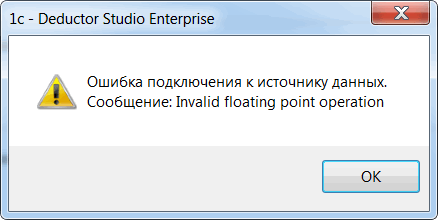
Данная ошибка может возникать при выполнении узлов импорта из 1С или при тестировании настроенного подключения. Диагностируется при интеграции с платформой 1С версии 8.3.10, использующей серверную архитектуру.
В случае если сценарий импорта из 1С выполняется интерактивно в интерфейсе DStudio, решение для данной ошибки следующее:
- Открыть в текстовом редакторе файл сценария (расширение «ded»);
- Найти раздел «EnvironmentVariables» и в описании переменной «DisableFloatExceptions» добавить строку 1 :
- Сохранить файл сценария.
Значение переменной «DisableFloatExceptions» при правильной правке сценария отразится в настройках Deductor (Рис. 2)
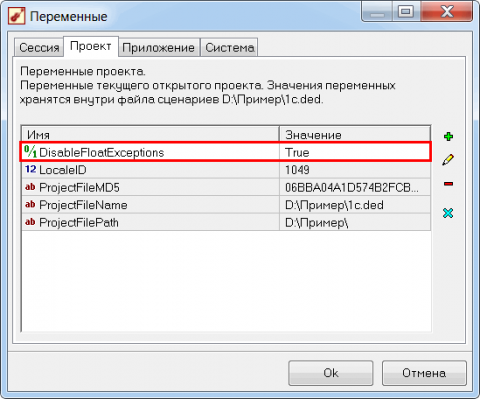
Важно: При изменении и последующем сохранении сценария в DStudio данные изменения могут быть утеряны.
В случае если сценарий используется в пакетном режиме, решение следующее:
Необходимо использовать управляющий сценарий, в котором при помощи узла «Команда ОС» запускать на выполнение DStudio.exe с параметрами запуска сценария импорта из 1С. При этом сам сценарий импорта из 1С править вышеописанным способом не надо, значение переменной DisableFloatExceptions можно передавать в параметрах запуска сценария. В узле «Команда ОС» строка запуска будет примерно такой:
Важно: Необходимо обратить внимание, что при изменении значения переменной DisableFloatExceptions результат работы узла Калькулятор может поменяться, а именно меняется результат обработки значения NULL. Пример: при DisableFloatExceptions = True значение выражения Round(Null()) > 1 возвращает False . При DisableFloatExceptions = False это выражение возвращает Null . В связи с этим, при применении данного решения необходимо проверить работу сценария.

Ошибку runtime error могут вызвать множество причин и одна из самых распространенных — это установка новых версий программ поверх уже установленных, что приводит к появлению ошибок в системном реестре. Другая распространенная причина — связана с деятельностью различных вирусов, троянов и рекламных шпионов, которые проникают на ваш компьютер и могут удалить, либо модифицировать критически важные файлы вашей операционной системы.
Ошибку runtime error достаточно легко исправить. В 99% случаев, любой чистильщик реестра поможет восстановить удаленные файлы, либо исправить поврежденные. Чистильщики реестра специально разработаны для исправления большинства ошибок, связанных с runtime error, в том числе и runtime error 91, runtime error 13 и многих других, т.к. они проверяют целостность файловой системы.
Скачайте и установите себе программу для чистки реестра, например, CCleaner. Проведите полное сканирование вашего компьютера и найдите причины, которые вызывают ошибку runtime error. В зависимости от количества файлов на вашем компьютере, сканирование может занять время от нескольких минут до получаса. Приятным дополнением будет то, что чистильщик реестра не только исправит ошибки вида runtime error, но и увеличит производительность вашего компьютера.