
There is no simple built-in string function that does what you’re looking for, but you could use the more powerful regular expressions:
import re
[m.start() for m in re.finditer('test', 'test test test test')]
#[0, 5, 10, 15]
If you want to find overlapping matches, lookahead will do that:
[m.start() for m in re.finditer('(?=tt)', 'ttt')]
#[0, 1]
If you want a reverse find-all without overlaps, you can combine positive and negative lookahead into an expression like this:
search = 'tt'
[m.start() for m in re.finditer('(?=%s)(?!.{1,%d}%s)' % (search, len(search)-1, search), 'ttt')]
#[1]
re.finditer returns a generator, so you could change the [] in the above to () to get a generator instead of a list which will be more efficient if you’re only iterating through the results once.

answered Jan 12, 2011 at 2:43

moinudinmoinudin
133k45 gold badges189 silver badges214 bronze badges
9
>>> help(str.find)
Help on method_descriptor:

find(...)
    S.find(sub [,start [,end]]) -> int
Thus, we can build it ourselves:
def find_all(a_str, sub):
    start = 0
    while True:
        start = a_str.find(sub, start)
        if start == -1: return
        yield start
        start += len(sub) # use start += 1 to find overlapping matches

list(find_all('spam spam spam spam', 'spam')) # [0, 5, 10, 15]
No temporary strings or regexes required.

answered Jan 12, 2011 at 3:13

Karl KnechtelKarl Knechtel
61.5k11 gold badges97 silver badges146 bronze badges
6
Here’s a (very inefficient) way to get all (i.e. even overlapping) matches:
>>> string = "test test test test"
>>> [i for i in range(len(string)) if string.startswith('test', i)]
[0, 5, 10, 15]
answered Jan 12, 2011 at 2:48

thkalathkala
83.5k23 gold badges155 silver badges199 bronze badges
3
Use re.finditer:
import re
sentence = input("Give me a sentence ")
word = input("What word would you like to find ")
for match in re.finditer(word, sentence):
    print (match.start(), match.end())
For word = "this" and sentence = "this is a sentence this this" this will yield the output:
(0, 4)
(19, 23)
(24, 28)
answered Feb 3, 2016 at 19:01

IdosIdos
15k14 gold badges59 silver badges73 bronze badges
2
Again, old thread, but here’s my solution using a generator and plain str.find.
def findall(p, s):
    '''Yields all the positions of
    the pattern p in the string s.'''
    i = s.find(p)
    while i != -1:
        yield i
        i = s.find(p, i+1)
Example
x = 'banananassantana'
[(i, x[i:i+2]) for i in findall('na', x)]
returns
[(2, 'na'), (4, 'na'), (6, 'na'), (14, 'na')]
answered Dec 23, 2015 at 23:09

AkiRossAkiRoss
11.6k6 gold badges59 silver badges85 bronze badges
3
You can use re.finditer() for non-overlapping matches.
>>> import re
>>> aString = 'this is a string where the substring "is" is repeated several times'
>>> print [(a.start(), a.end()) for a in list(re.finditer('is', aString))]
[(2, 4), (5, 7), (38, 40), (42, 44)]
but won’t work for:
In [1]: aString="ababa"

In [2]: print [(a.start(), a.end()) for a in list(re.finditer('aba', aString))]
Output: [(0, 3)]

AnukuL
5751 gold badge7 silver badges21 bronze badges
answered Jan 12, 2011 at 2:55

Chinmay KanchiChinmay Kanchi
62.2k22 gold badges86 silver badges114 bronze badges
2
Come, let us recurse together.
def locations_of_substring(string, substring):
    """Return a list of locations of a substring."""

    substring_length = len(substring)
    def recurse(locations_found, start):
        location = string.find(substring, start)
        if location != -1:
            return recurse(locations_found + [location], location+substring_length)
        else:
            return locations_found

    return recurse([], 0)

print(locations_of_substring('this is a test for finding this and this', 'this'))
# prints [0, 27, 36]
No need for regular expressions this way.
answered Nov 1, 2013 at 3:16

Cody PiersallCody Piersall
8,2342 gold badges42 silver badges57 bronze badges
2
If you’re just looking for a single character, this would work:
string = "dooobiedoobiedoobie"
match = 'o'
reduce(lambda count, char: count + 1 if char == match else count, string, 0)
# produces 7
Also,
string = "test test test test"
match = "test"
len(string.split(match)) - 1
# produces 4
My hunch is that neither of these (especially #2) is terribly performant.
answered Sep 24, 2014 at 21:12

jstaabjstaab
3,30925 silver badges40 bronze badges
1
this is an old thread but i got interested and wanted to share my solution.
def find_all(a_string, sub):
    result = []
    k = 0
    while k < len(a_string):
        k = a_string.find(sub, k)
        if k == -1:
            return result
        else:
            result.append(k)
            k += 1 #change to k += len(sub) to not search overlapping results
    return result
It should return a list of positions where the substring was found.
Please comment if you see an error or room for improvment.
answered Apr 1, 2015 at 9:23

ThurinesThurines
1111 silver badge3 bronze badges
This does the trick for me using re.finditer
import re

text = 'This is sample text to test if this pythonic '
       'program can serve as an indexing platform for '
       'finding words in a paragraph. It can give '
       'values as to where the word is located with the '
       'different examples as stated'

#  find all occurances of the word 'as' in the above text

find_the_word = re.finditer('as', text)

for match in find_the_word:
    print('start {}, end {}, search string '{}''.
          format(match.start(), match.end(), match.group()))
answered Jul 6, 2018 at 9:34

Bruno VermeulenBruno Vermeulen
2,8732 gold badges14 silver badges28 bronze badges
This thread is a little old but this worked for me:
numberString = "onetwothreefourfivesixseveneightninefiveten"
testString = "five"

marker = 0
while marker < len(numberString):
    try:
        print(numberString.index("five",marker))
        marker = numberString.index("five", marker) + 1
    except ValueError:
        print("String not found")
        marker = len(numberString)

wingerse
3,6301 gold badge28 silver badges57 bronze badges
answered Sep 1, 2014 at 12:48

Andrew HAndrew H
46610 silver badges22 bronze badges
You can try :
>>> string = "test test test test"
>>> for index,value in enumerate(string):
    if string[index:index+(len("test"))] == "test":
        print index

0
5
10
15
answered Feb 27, 2018 at 6:44

Harsha BiyaniHarsha Biyani
7,0199 gold badges37 silver badges61 bronze badges
You can try :
import re
str1 = "This dress looks good; you have good taste in clothes."
substr = "good"
result = [_.start() for _ in re.finditer(substr, str1)]
# result = [17, 32]
answered Oct 25, 2021 at 10:13

2
When looking for a large amount of key words in a document, use flashtext
from flashtext import KeywordProcessor
words = ['test', 'exam', 'quiz']
txt = 'this is a test'
kwp = KeywordProcessor()
kwp.add_keywords_from_list(words)
result = kwp.extract_keywords(txt, span_info=True)
Flashtext runs faster than regex on large list of search words.
answered Sep 28, 2018 at 17:29

Uri GorenUri Goren
13.2k6 gold badges57 silver badges109 bronze badges
This function does not look at all positions inside the string, it does not waste compute resources. My try:
def findAll(string,word):
    all_positions=[]
    next_pos=-1
    while True:
        next_pos=string.find(word,next_pos+1)
        if(next_pos<0):
            break
        all_positions.append(next_pos)
    return all_positions
to use it call it like this:
result=findAll('this word is a big word man how many words are there?','word')
answered Jan 13, 2020 at 12:39

0
src = input() # we will find substring in this string
sub = input() # substring

res = []
pos = src.find(sub)
while pos != -1:
    res.append(pos)
    pos = src.find(sub, pos + 1)
answered May 16, 2020 at 17:05

mascaimascai
1,1351 gold badge8 silver badges26 bronze badges
1
Whatever the solutions provided by others are completely based on the available method find() or any available methods.
What is the core basic algorithm to find all the occurrences of a
substring in a string?
def find_all(string,substring):
    """
    Function: Returning all the index of substring in a string
    Arguments: String and the search string
    Return:Returning a list
    """
    length = len(substring)
    c=0
    indexes = []
    while c < len(string):
        if string[c:c+length] == substring:
            indexes.append(c)
        c=c+1
    return indexes
You can also inherit str class to new class and can use this function
below.
class newstr(str):
def find_all(string,substring):
    """
    Function: Returning all the index of substring in a string
    Arguments: String and the search string
    Return:Returning a list
    """
    length = len(substring)
    c=0
    indexes = []
    while c < len(string):
        if string[c:c+length] == substring:
            indexes.append(c)
        c=c+1
    return indexes
Calling the method
newstr.find_all(‘Do you find this answer helpful? then upvote
this!’,’this’)
answered Feb 15, 2018 at 20:02

This is solution of a similar question from hackerrank. I hope this could help you.
import re
a = input()
b = input()
if b not in a:
    print((-1,-1))
else:
    #create two list as
    start_indc = [m.start() for m in re.finditer('(?=' + b + ')', a)]
    for i in range(len(start_indc)):
        print((start_indc[i], start_indc[i]+len(b)-1))
Output:
aaadaa
aa
(0, 1)
(1, 2)
(4, 5)

answered Jan 20, 2020 at 22:47

if you want to use without re(regex) then:
find_all = lambda _str,_w : [ i for i in range(len(_str)) if _str.startswith(_w,i) ]

string = "test test test test"
print( find_all(string, 'test') ) # >>> [0, 5, 10, 15]
answered Nov 5, 2021 at 8:38

WangSungWangSung
2192 silver badges5 bronze badges
Here’s a solution that I came up with, using assignment expression (new feature since Python 3.8):
string = "test test test test"
phrase = "test"
start = -1
result = [(start := string.find(phrase, start + 1)) for _ in range(string.count(phrase))]
Output:
[0, 5, 10, 15]
answered Apr 8, 2022 at 10:06

MikeMike
1132 silver badges6 bronze badges
I think the most clean way of solution is without libraries and yields:
def find_all_occurrences(string, sub):
    index_of_occurrences = []
    current_index = 0
    while True:
        current_index = string.find(sub, current_index)
        if current_index == -1:
            return index_of_occurrences
        else:
            index_of_occurrences.append(current_index)
            current_index += len(sub)

find_all_occurrences(string, substr)
Note: find() method returns -1 when it can’t find anything

SUTerliakov
4,7263 gold badges14 silver badges36 bronze badges
answered Oct 13, 2022 at 20:06

ulas.kesikulas.kesik
1181 silver badge5 bronze badges
The pythonic way would be:
mystring = 'Hello World, this should work!'
find_all = lambda c,s: [x for x in range(c.find(s), len(c)) if c[x] == s]

# s represents the search string
# c represents the character string

find_all(mystring,'o')    # will return all positions of 'o'

[4, 7, 20, 26]
>>>

perror
6,96316 gold badges58 silver badges85 bronze badges
answered Apr 10, 2018 at 19:40

2
if you only want to use numpy here is a solution
import numpy as np

S= "test test test test"
S2 = 'test'
inds = np.cumsum([len(k)+len(S2) for k in S.split(S2)[:-1]])- len(S2)
print(inds)
answered Jun 10, 2021 at 16:46

please look at below code
#!/usr/bin/env python
# coding:utf-8
'''黄哥Python'''


def get_substring_indices(text, s):
    result = [i for i in range(len(text)) if text.startswith(s, i)]
    return result


if __name__ == '__main__':
    text = "How much wood would a wood chuck chuck if a wood chuck could chuck wood?"
    s = 'wood'
    print get_substring_indices(text, s)
answered Mar 16, 2017 at 1:14

黄哥Python培训黄哥Python培训
2392 silver badges5 bronze badges
1
def find_index(string, let):
    enumerated = [place  for place, letter in enumerate(string) if letter == let]
    return enumerated
for example :
find_index("hey doode find d", "d")
returns:
[4, 7, 13, 15]

answered Nov 8, 2020 at 13:49

1
Not exactly what OP asked but you could also use the split function to get a list of where all the substrings don’t occur. OP didn’t specify the end goal of the code but if your goal is to remove the substrings anyways then this could be a simple one-liner. There are probably more efficient ways to do this with larger strings; regular expressions would be preferable in that case
# Extract all non-substrings
s = "an-example-string"
s_no_dash = s.split('-')
# >>> s_no_dash
# ['an', 'example', 'string']

# Or extract and join them into a sentence
s_no_dash2 = ' '.join(s.split('-'))
# >>> s_no_dash2
# 'an example string'
Did a brief skim of other answers so apologies if this is already up there.
answered May 19, 2021 at 13:43

als0052als0052
3893 silver badges12 bronze badges
def count_substring(string, sub_string):
    c=0
    for i in range(0,len(string)-2):
        if string[i:i+len(sub_string)] == sub_string:
            c+=1
    return c

if __name__ == '__main__':
    string = input().strip()
    sub_string = input().strip()

    count = count_substring(string, sub_string)
    print(count)
answered Jun 2, 2021 at 3:24

2
I runned in the same problem and did this:
hw = 'Hello oh World!'
list_hw = list(hw)
o_in_hw = []

while True:
    o = hw.find('o')
    if o != -1:
        o_in_hw.append(o)
        list_hw[o] = ' '
        hw = ''.join(list_hw)
    else:
        print(o_in_hw)
        break
Im pretty new at coding so you can probably simplify it (and if planned to used continuously of course make it a function).
All and all it works as intended for what i was doing.
Edit: Please consider this is for single characters only, and it will change your variable, so you have to create a copy of the string in a new variable to save it, i didnt put it in the code cause its easy and its only to show how i made it work.
answered Jun 25, 2021 at 20:18

By slicing we find all the combinations possible and append them in a list and find the number of times it occurs using count function
s=input()
n=len(s)
l=[]
f=input()
print(s[0])
for i in range(0,n):
    for j in range(1,n+1):
        l.append(s[i:j])
if f in l:
    print(l.count(f))

barbsan
3,40811 gold badges21 silver badges28 bronze badges
answered Jul 30, 2019 at 11:44

2
To find all the occurence of a character in a give string and return as a dictionary
eg: hello
result :
{‘h’:1, ‘e’:1, ‘l’:2, ‘o’:1}
def count(string):
   result = {}
   if(string):
     for i in string:
       result[i] = string.count(i)
     return result
   return {}
or else you do like this
from collections import Counter

   def count(string):
      return Counter(string)
answered Apr 30, 2022 at 8:00

Часто нам нужно найти символ в строке python. Для решения этой задачи разработчики используют метод find(). Он помогает найти индекс первого совпадения подстроки в строке. Если символ или подстрока не найдены, find возвращает -1.
Синтаксис
string.find(substring,start,end)Метод find принимает три параметра:
substring(символ/подстрока) — подстрока, которую нужно найти в данной строке.start(необязательный) — первый индекс, с которого нужно начинать поиск. По умолчанию значение равно 0.end(необязательный) — индекс, на котором нужно закончить поиск. По умолчанию равно длине строки.
Параметры, которые передаются в метод, — это подстрока, которую требуются найти, индекс начала и конца поиска. Значение по умолчанию для начала поиска — 0, а для конца — длина строки.
В этом примере используем метод со значениями по умолчанию.
Метод find() будет искать символ и вернет положение первого совпадения. Даже если символ встречается несколько раз, то метод вернет только положение первого совпадения.
>>> string = "Добро пожаловать!"

>>> print("Индекс первой буквы 'о':", string.find("о"))

Индекс первой буквы 'о': 1
Поиск не с начала строки с аргументом start
Можно искать подстроку, указав также начальное положение поиска.
В этом примере обозначим стартовое положение значением 8 и метод начнет искать с символа с индексом 8. Последним положением будет длина строки — таким образом метод выполнит поиска с индекса 8 до окончания строки.
>>> string = "Специалисты назвали плюсы и минусы Python"

>>> print("Индекс подстроки 'али' без учета первых 8 символов:", string.find("али", 8))

Индекс подстроки 'али' без учета первых 8 символов: 16
Поиск символа в подстроке со start и end
С помощью обоих аргументов (start и end) можно ограничить поиск и не проводить его по всей строке. Найдем индексы слова «пожаловать» и повторим поиск по букве «о».
>>> string = "Добро пожаловать!"

>>> start = string.find("п")

>>> end = string.find("ь") + 1

>>> print("Индекс первой буквы 'о' в подстроке:", string.find("о", start, end))

Индекс первой буквы 'о' в подстроке: 7
Проверка есть ли символ в строке
Мы знаем, что метод find() позволяет найти индекс первого совпадения подстроки. Он возвращает -1 в том случае, если подстрока не была найдена.
>>> string = "Добро пожаловать!"

>>> print("Есть буква 'г'?", string.find("г") != -1)

Есть буква 'г'? False

>>> print("Есть буква 'т'?", string.find("т") != -1)

Есть буква 'т'? True
Поиск последнего вхождения символа в строку
Функция rfind() напоминает find(), а единое отличие в том, что она возвращает максимальный индекс. В обоих случаях же вернется -1, если подстрока не была найдена.
В следующем примере есть строка «Добро пожаловать!». Попробуем найти в ней символ «о» с помощью методов find() и rfind().
>>> string = "Добро пожаловать"

>>> print("Поиск 'о' методом find:", string.find("о"))

Поиск 'о' методом find: 1

>>> print("Поиск 'о' методом rfind:", string.rfind("о"))

Поиск 'о' методом rfind: 11
Вывод показывает, что find() возвращает индекс первого совпадения подстроки, а rfind() — последнего совпадения.
Второй способ поиска — index()
Метод index() помогает найти положение данной подстроки по аналогии с find(). Единственное отличие в том, что index() бросит исключение в том случае, если подстрока не будет найдена, а find() просто вернет -1.
Вот рабочий пример, показывающий разницу в поведении index() и find():
>>> string = "Добро пожаловать"

>>> print("Поиск 'о' методом find:", string.find("о"))

Поиск 'о' методом find: 1

>>> print("Поиск 'о' методом index:", string.index("о"))

Поиск 'о' методом index: 1
В обоих случаях возвращается одна и та же позиция. А теперь попробуем с подстрокой, которой нет в строке:
>>> string = "Добро пожаловать"

>>> print("Поиск 'г' методом find:", string.find("г"))

Поиск 'г' методом find: 1

>>> print("Поиск 'г' методом index:", string.index("г"))

Traceback (most recent call last):

  File "pyshell#21", line 1, in module

    print("Поиск 'г' методом index:", string.index("г"))

ValueError: substring not found
В этом примере мы пытались найти подстроку «г». Ее там нет, поэтому find() возвращает -1, а index() бросает исключение.
Поиск всех вхождений символа в строку
Чтобы найти общее количество совпадений подстроки в строке можно использовать ту же функцию find(). Пройдемся циклом while по строке и будем задействовать параметр start из метода find().
Изначально переменная start будет равна -1, что бы прибавлять 1 у каждому новому поиску и начать с 0. Внутри цикла проверяем, присутствует ли подстрока в строке с помощью метода find.
Если вернувшееся значение не равно -1, то обновляем значением count.
Вот рабочий пример:
my_string = "Добро пожаловать"

start = -1

count = 0

while True:

    start = my_string.find("о", start+1)

    if start == -1:

        break

    count += 1

print("Количество вхождений символа в строку: ", count )
Количество вхождений символа в строку: 4Выводы
- Метод
find()помогает найти индекс первого совпадения подстроки в данной строке. Возвращает -1, если подстрока не была найдена. - В метод передаются три параметра: подстрока, которую нужно найти,
startсо значением по умолчанию равным 0 иendсо значением по умолчанию равным длине строки. - Можно искать подстроку в данной строке, задав начальное положение, с которого следует начинать поиск.
- С помощью параметров
startиendможно ограничить зону поиска, чтобы не выполнять его по всей строке. - Функция
rfind()повторяет возможностиfind(), но возвращает максимальный индекс (то есть, место последнего совпадения). В обоих случаях возвращается -1, если подстрока не была найдена. index()— еще одна функция, которая возвращает положение подстроки. Отличие лишь в том, чтоindex()бросает исключение, если подстрока не была найдена, аfind()возвращает -1.find()можно использовать в том числе и для поиска общего числа совпадений подстроки.
Watch Now This tutorial has a related video course created by the Real Python team. Watch it together with the written tutorial to deepen your understanding: Check if a Python String Contains a Substring
If you’re new to programming or come from a programming language other than Python, you may be looking for the best way to check whether a string contains another string in Python.
Identifying such substrings comes in handy when you’re working with text content from a file or after you’ve received user input. You may want to perform different actions in your program depending on whether a substring is present or not.
In this tutorial, you’ll focus on the most Pythonic way to tackle this task, using the membership operator in. Additionally, you’ll learn how to identify the right string methods for related, but different, use cases.
Finally, you’ll also learn how to find substrings in pandas columns. This is helpful if you need to search through data from a CSV file. You could use the approach that you’ll learn in the next section, but if you’re working with tabular data, it’s best to load the data into a pandas DataFrame and search for substrings in pandas.
How to Confirm That a Python String Contains Another String
If you need to check whether a string contains a substring, use Python’s membership operator in. In Python, this is the recommended way to confirm the existence of a substring in a string:
>>>
>>> raw_file_content = """Hi there and welcome.
... This is a special hidden file with a SECRET secret.
... I don't want to tell you The Secret,
... but I do want to secretly tell you that I have one."""

>>> "secret" in raw_file_content
True
The in membership operator gives you a quick and readable way to check whether a substring is present in a string. You may notice that the line of code almost reads like English.
When you use in, the expression returns a Boolean value:
Trueif Python found the substringFalseif Python didn’t find the substring
You can use this intuitive syntax in conditional statements to make decisions in your code:
>>>
>>> if "secret" in raw_file_content:
...    print("Found!")
...
Found!
In this code snippet, you use the membership operator to check whether "secret" is a substring of raw_file_content. If it is, then you’ll print a message to the terminal. Any indented code will only execute if the Python string that you’re checking contains the substring that you provide.
The membership operator in is your best friend if you just need to check whether a Python string contains a substring.
However, what if you want to know more about the substring? If you read through the text stored in raw_file_content, then you’ll notice that the substring occurs more than once, and even in different variations!
Which of these occurrences did Python find? Does capitalization make a difference? How often does the substring show up in the text? And what’s the location of these substrings? If you need the answer to any of these questions, then keep on reading.
Generalize Your Check by Removing Case Sensitivity
Python strings are case sensitive. If the substring that you provide uses different capitalization than the same word in your text, then Python won’t find it. For example, if you check for the lowercase word "secret" on a title-case version of the original text, the membership operator check returns False:
>>>
>>> title_cased_file_content = """Hi There And Welcome.
... This Is A Special Hidden File With A Secret Secret.
... I Don't Want To Tell You The Secret,
... But I Do Want To Secretly Tell You That I Have One."""

>>> "secret" in title_cased_file_content
False
Despite the fact that the word secret appears multiple times in the title-case text title_cased_file_content, it never shows up in all lowercase. That’s why the check that you perform with the membership operator returns False. Python can’t find the all-lowercase string "secret" in the provided text.
Humans have a different approach to language than computers do. This is why you’ll often want to disregard capitalization when you check whether a string contains a substring in Python.
You can generalize your substring check by converting the whole input text to lowercase:
>>>
>>> file_content = title_cased_file_content.lower()

>>> print(file_content)
hi there and welcome.
this is a special hidden file with a secret secret.
i don't want to tell you the secret,
but i do want to secretly tell you that i have one.

>>> "secret" in file_content
True
Converting your input text to lowercase is a common way to account for the fact that humans think of words that only differ in capitalization as the same word, while computers don’t.
Now that you’ve converted the string to lowercase to avoid unintended issues stemming from case sensitivity, it’s time to dig further and learn more about the substring.
Learn More About the Substring
The membership operator in is a great way to descriptively check whether there’s a substring in a string, but it doesn’t give you any more information than that. It’s perfect for conditional checks—but what if you need to know more about the substrings?
Python provides many additonal string methods that allow you to check how many target substrings the string contains, to search for substrings according to elaborate conditions, or to locate the index of the substring in your text.
In this section, you’ll cover some additional string methods that can help you learn more about the substring.
By using in, you confirmed that the string contains the substring. But you didn’t get any information on where the substring is located.
If you need to know where in your string the substring occurs, then you can use .index() on the string object:
>>>
>>> file_content = """hi there and welcome.
... this is a special hidden file with a secret secret.
... i don't want to tell you the secret,
... but i do want to secretly tell you that i have one."""

>>> file_content.index("secret")
59
When you call .index() on the string and pass it the substring as an argument, you get the index position of the first character of the first occurrence of the substring.
But what if you want to find other occurrences of the substring? The .index() method also takes a second argument that can define at which index position to start looking. By passing specific index positions, you can therefore skip over occurrences of the substring that you’ve already identified:
>>>
>>> file_content.index("secret", 60)
66
When you pass a starting index that’s past the first occurrence of the substring, then Python searches starting from there. In this case, you get another match and not a ValueError.
That means that the text contains the substring more than once. But how often is it in there?
You can use .count() to get your answer quickly using descriptive and idiomatic Python code:
>>>
>>> file_content.count("secret")
4
You used .count() on the lowercase string and passed the substring "secret" as an argument. Python counted how often the substring appears in the string and returned the answer. The text contains the substring four times. But what do these substrings look like?
You can inspect all the substrings by splitting your text at default word borders and printing the words to your terminal using a for loop:
>>>
>>> for word in file_content.split():
...    if "secret" in word:
...        print(word)
...
secret
secret.
secret,
secretly
In this example, you use .split() to separate the text at whitespaces into strings, which Python packs into a list. Then you iterate over this list and use in on each of these strings to see whether it contains the substring "secret".
Now that you can inspect all the substrings that Python identifies, you may notice that Python doesn’t care whether there are any characters after the substring "secret" or not. It finds the word whether it’s followed by whitespace or punctuation. It even finds words such as "secretly".
That’s good to know, but what can you do if you want to place stricter conditions on your substring check?
Find a Substring With Conditions Using Regex
You may only want to match occurrences of your substring followed by punctuation, or identify words that contain the substring plus other letters, such as "secretly".
For such cases that require more involved string matching, you can use regular expressions, or regex, with Python’s re module.
For example, if you want to find all the words that start with "secret" but are then followed by at least one additional letter, then you can use the regex word character (w) followed by the plus quantifier (+):
>>>
>>> import re

>>> file_content = """hi there and welcome.
... this is a special hidden file with a secret secret.
... i don't want to tell you the secret,
... but i do want to secretly tell you that i have one."""

>>> re.search(r"secretw+", file_content)
<re.Match object; span=(128, 136), match='secretly'>
The re.search() function returns both the substring that matched the condition as well as its start and end index positions—rather than just True!
You can then access these attributes through methods on the Match object, which is denoted by m:
>>>
>>> m = re.search(r"secretw+", file_content)

>>> m.group()
'secretly'

>>> m.span()
(128, 136)
These results give you a lot of flexibility to continue working with the matched substring.
For example, you could search for only the substrings that are followed by a comma (,) or a period (.):
>>>
>>> re.search(r"secret[.,]", file_content)
<re.Match object; span=(66, 73), match='secret.'>
There are two potential matches in your text, but you only matched the first result fitting your query. When you use re.search(), Python again finds only the first match. What if you wanted all the mentions of "secret" that fit a certain condition?
To find all the matches using re, you can work with re.findall():
>>>
>>> re.findall(r"secret[.,]", file_content)
['secret.', 'secret,']
By using re.findall(), you can find all the matches of the pattern in your text. Python saves all the matches as strings in a list for you.
When you use a capturing group, you can specify which part of the match you want to keep in your list by wrapping that part in parentheses:
>>>
>>> re.findall(r"(secret)[.,]", file_content)
['secret', 'secret']
By wrapping secret in parentheses, you defined a single capturing group. The findall() function returns a list of strings matching that capturing group, as long as there’s exactly one capturing group in the pattern. By adding the parentheses around secret, you managed to get rid of the punctuation!
Using re.findall() with match groups is a powerful way to extract substrings from your text. But you only get a list of strings, which means that you’ve lost the index positions that you had access to when you were using re.search().
If you want to keep that information around, then re can give you all the matches in an iterator:
>>>
>>> for match in re.finditer(r"(secret)[.,]", file_content):
...    print(match)
...
<re.Match object; span=(66, 73), match='secret.'>
<re.Match object; span=(103, 110), match='secret,'>
When you use re.finditer() and pass it a search pattern and your text content as arguments, you can access each Match object that contains the substring, as well as its start and end index positions.
You may notice that the punctuation shows up in these results even though you’re still using the capturing group. That’s because the string representation of a Match object displays the whole match rather than just the first capturing group.
But the Match object is a powerful container of information and, like you’ve seen earlier, you can pick out just the information that you need:
>>>
>>> for match in re.finditer(r"(secret)[.,]", file_content):
...    print(match.group(1))
...
secret
secret
By calling .group() and specifying that you want the first capturing group, you picked the word secret without the punctuation from each matched substring.
You can go into much more detail with your substring matching when you use regular expressions. Instead of just checking whether a string contains another string, you can search for substrings according to elaborate conditions.
Using regular expressions with re is a good approach if you need information about the substrings, or if you need to continue working with them after you’ve found them in the text. But what if you’re working with tabular data? For that, you’ll turn to pandas.
Find a Substring in a pandas DataFrame Column
If you work with data that doesn’t come from a plain text file or from user input, but from a CSV file or an Excel sheet, then you could use the same approach as discussed above.
However, there’s a better way to identify which cells in a column contain a substring: you’ll use pandas! In this example, you’ll work with a CSV file that contains fake company names and slogans. You can download the file below if you want to work along:
When you’re working with tabular data in Python, it’s usually best to load it into a pandas DataFrame first:
>>>
>>> import pandas as pd

>>> companies = pd.read_csv("companies.csv")

>>> companies.shape
(1000, 2)

>>> companies.head()
             company                                     slogan
0      Kuvalis-Nolan      revolutionize next-generation metrics
1  Dietrich-Champlin  envisioneer bleeding-edge functionalities
2           West Inc            mesh user-centric infomediaries
3         Wehner LLC               utilize sticky infomediaries
4      Langworth Inc                 reinvent magnetic networks
In this code block, you loaded a CSV file that contains one thousand rows of fake company data into a pandas DataFrame and inspected the first five rows using .head().
After you’ve loaded the data into the DataFrame, you can quickly query the whole pandas column to filter for entries that contain a substring:
>>>
>>> companies[companies.slogan.str.contains("secret")]
              company                                  slogan
7          Maggio LLC                    target secret niches
117      Kub and Sons              brand secret methodologies
654       Koss-Zulauf              syndicate secret paradigms
656      Bernier-Kihn  secretly synthesize back-end bandwidth
921      Ward-Shields               embrace secret e-commerce
945  Williamson Group             unleash secret action-items
You can use .str.contains() on a pandas column and pass it the substring as an argument to filter for rows that contain the substring.
When you’re working with .str.contains() and you need more complex match scenarios, you can also use regular expressions! You just need to pass a regex-compliant search pattern as the substring argument:
>>>
>>> companies[companies.slogan.str.contains(r"secretw+")]
          company                                  slogan
656  Bernier-Kihn  secretly synthesize back-end bandwidth
In this code snippet, you’ve used the same pattern that you used earlier to match only words that contain secret but then continue with one or more word character (w+). Only one of the companies in this fake dataset seems to operate secretly!
You can write any complex regex pattern and pass it to .str.contains() to carve from your pandas column just the rows that you need for your analysis.
Conclusion
Like a persistent treasure hunter, you found each "secret", no matter how well it was hidden! In the process, you learned that the best way to check whether a string contains a substring in Python is to use the in membership operator.
You also learned how to descriptively use two other string methods, which are often misused to check for substrings:
.count()to count the occurrences of a substring in a string.index()to get the index position of the beginning of the substring
After that, you explored how to find substrings according to more advanced conditions with regular expressions and a few functions in Python’s re module.
Finally, you also learned how you can use the DataFrame method .str.contains() to check which entries in a pandas DataFrame contain a substring .
You now know how to pick the most idiomatic approach when you’re working with substrings in Python. Keep using the most descriptive method for the job, and you’ll write code that’s delightful to read and quick for others to understand.
Watch Now This tutorial has a related video course created by the Real Python team. Watch it together with the written tutorial to deepen your understanding: Check if a Python String Contains a Substring

When you’re working with a Python program, you might need to search for and locate a specific string inside another string.
This is where Python’s built-in string methods come in handy.
In this article, you will learn how to use Python’s built-in find() string method to help you search for a substring inside a string.
Here is what we will cover:
- Syntax of the
find()method- How to use
find()with no start and end parameters example - How to use
find()with start and end parameters example - Substring not found example
- Is the
find()method case-sensitive?
- How to use
find()vsinkeywordfind()vsindex()
The find() Method — A Syntax Overview
The find() string method is built into Python’s standard library.
It takes a substring as input and finds its index — that is, the position of the substring inside the string you call the method on.
The general syntax for the find() method looks something like this:
string_object.find("substring", start_index_number, end_index_number)
Let’s break it down:
string_objectis the original string you are working with and the string you will call thefind()method on. This could be any word you want to search through.- The
find()method takes three parameters – one required and two optional. "substring"is the first required parameter. This is the substring you are trying to find insidestring_object. Make sure to include quotation marks.start_index_numberis the second parameter and it’s optional. It specifies the starting index and the position from which the search will start. The default value is0.end_index_numberis the third parameter and it’s also optional. It specifies the end index and where the search will stop. The default is the length of the string.- Both the
start_index_numberand theend_index_numberspecify the range over which the search will take place and they narrow the search down to a particular section.
The return value of the find() method is an integer value.
If the substring is present in the string, find() returns the index, or the character position, of the first occurrence of the specified substring from that given string.
If the substring you are searching for is not present in the string, then find() will return -1. It will not throw an exception.
How to Use find() with No Start and End Parameters Example
The following examples illustrate how to use the find() method using the only required parameter – the substring you want to search.
You can take a single word and search to find the index number of a specific letter:
fave_phrase = "Hello world!"

# find the index of the letter 'w'
search_fave_phrase = fave_phrase.find("w")

print(search_fave_phrase)

#output

# 6
I created a variable named fave_phrase and stored the string Hello world!.
I called the find() method on the variable containing the string and searched for the letter ‘w’ inside Hello world!.
I stored the result of the operation in a variable named search_fave_phrase and then printed its contents to the console.
The return value was the index of w which in this case was the integer 6.
Keep in mind that indexing in programming and Computer Science in general always starts at 0 and not 1.
How to Use find() with Start and End Parameters Example
Using the start and end parameters with the find() method lets you limit your search.
For example, if you wanted to find the index of the letter ‘w’ and start the search from position 3 and not earlier, you would do the following:
fave_phrase = "Hello world!"

# find the index of the letter 'w' starting from position 3
search_fave_phrase = fave_phrase.find("w",3)

print(search_fave_phrase)

#output

# 6
Since the search starts at position 3, the return value will be the first instance of the string containing ‘w’ from that position and onwards.
You can also narrow down the search even more and be more specific with your search with the end parameter:
fave_phrase = "Hello world!"

# find the index of the letter 'w' between the positions 3 and 8
search_fave_phrase = fave_phrase.find("w",3,8)

print(search_fave_phrase)

#output

# 6
Substring Not Found Example
As mentioned earlier, if the substring you specify with find() is not present in the string, then the output will be -1 and not an exception.
fave_phrase = "Hello world!"

# search for the index of the letter 'a' in "Hello world"
search_fave_phrase = fave_phrase.find("a")

print(search_fave_phrase)

# -1
Is the find() Method Case-Sensitive?
What happens if you search for a letter in a different case?
fave_phrase = "Hello world!"

#search for the index of the letter 'W' capitalized
search_fave_phrase = fave_phrase.find("W")

print(search_fave_phrase)

#output

# -1
In an earlier example, I searched for the index of the letter w in the phrase «Hello world!» and the find() method returned its position.
In this case, searching for the letter W capitalized returns -1 – meaning the letter is not present in the string.
So, when searching for a substring with the find() method, remember that the search will be case-sensitive.
The find() Method vs the in Keyword – What’s the Difference?
Use the in keyword to check if the substring is present in the string in the first place.
The general syntax for the in keyword is the following:
substring in string
The in keyword returns a Boolean value – a value that is either True or False.
>>> "w" in "Hello world!"
True
The in operator returns True when the substring is present in the string.
And if the substring is not present, it returns False:
>>> "a" in "Hello world!"
False
Using the in keyword is a helpful first step before using the find() method.
You first check to see if a string contains a substring, and then you can use find() to find the position of the substring. That way, you know for sure that the substring is present.
So, use find() to find the index position of a substring inside a string and not to look if the substring is present in the string.
The find() Method vs the index() Method – What’s the Difference?
Similar to the find() method, the index() method is a string method used for finding the index of a substring inside a string.
So, both methods work in the same way.
The difference between the two methods is that the index() method raises an exception when the substring is not present in the string, in contrast to the find() method that returns the -1 value.
fave_phrase = "Hello world!"

# search for the index of the letter 'a' in 'Hello world!'
search_fave_phrase = fave_phrase.index("a")

print(search_fave_phrase)

#output

# Traceback (most recent call last):
#  File "/Users/dionysialemonaki/python_article/demopython.py", line 4, in <module>
#    search_fave_phrase = fave_phrase.index("a")
# ValueError: substring not found
The example above shows that index() throws a ValueError when the substring is not present.
You may want to use find() over index() when you don’t want to deal with catching and handling any exceptions in your programs.
Conclusion
And there you have it! You now know how to search for a substring in a string using the find() method.
I hope you found this tutorial helpful.
To learn more about the Python programming language, check out freeCodeCamp’s Python certification.
You’ll start from the basics and learn in an interactive and beginner-friendly way. You’ll also build five projects at the end to put into practice and help reinforce your understanding of the concepts you learned.
Thank you for reading, and happy coding!
Happy coding!
Learn to code for free. freeCodeCamp’s open source curriculum has helped more than 40,000 people get jobs as developers. Get started
#статьи
- 5 окт 2022
-

0

Исчерпывающий гайд по работе с мощным инструментом для анализа и обработки строк.
Иллюстрация: Оля Ежак для SKillbox Media

Журналист, изучает Python. Любит разбираться в мелочах, общаться с людьми и понимать их.
Само словосочетание «регулярные выражения» звучит непонятно и выглядит страшно, но на самом деле ничего сложного в работе с ними нет. В этой статье мы познакомим вас с их логикой и основными принципами и научим разговаривать на языке шаблонов. В хорошем смысле слова.
Содержание:
- Что такое регулярные выражения
- Синтаксис регулярок
- Как ведётся поиск
- Квантификаторы и логическое ИЛИ при группировке
- Регулярные выражения в Python: модуль re и Match-объекты
- Жадный и ленивый пропуск
- Примеры и задачи
Представьте, что вы снова в школе, на уроке истории. Вам нужно решить итоговую контрольную работу по всем датам, которые проходили в четверти.
Но тут вас поджидает препятствие: все даты разбросаны по нескольким главам учебника по десятку страниц каждая. Читать полкниги в поисках нужных вам крупиц информации — такое себе удовольствие. Тем более когда каждая минута на счету.
К счастью, вы — человек неглупый (не зря же пошли в IT), тренированный и быстро соображающий. Поэтому моментально замечаете основные закономерности:
- даты обозначаются цифрами: арабскими, если это год и месяц, и римскими, если век;
- учебник — по истории позднего Средневековья и Нового времени, поэтому все даты, написанные арабскими цифрами, — четырёхсимвольные;
- после римских цифр всегда идёт слово «век».
Теперь у вас есть шаблон нужной информации. Остаётся лишь пролистать страницу за страницей и записать даты в смартфон (или себе на подкорку). Вуаля: пятёрка за четверть у вас в дневнике, а премия от родителей за отличную учёбу — в кармане.
По такому же принципу работают и регулярные выражения: они ведут поиск фрагментов текста по определённому шаблону. Если фрагмент совпадает с шаблоном — с ним можно работать.
Запишем логику поиска исторических дат в виде регулярных выражений (они ещё называются Regular Expressions, сокращённо regex или regexp). Выглядеть он будет так:
(?:d{4})|(?:[IVX]+ век)
Приятные новости: regex — настолько полезный и мощный инструмент, что поддерживается почти всеми современными языками программирования, в том числе и Python. Причём соответствующий синтаксис в разных языках очень схож. Так что, выучив его в одном языке, можно пользоваться им в других, практически не переучиваясь. Поехали.
С помощью regex можно искать как вполне конкретные выражения (например, слово «век» — последовательность букв «в», «е» и «к»), так и что-то более общее (например, любую букву или цифру).
Для обозначения второй категории существуют специальные символы. Вот некоторые из них:
| Символ | Что означает | Пример использования шаблона | Пример вывода |
|---|---|---|---|
| . | Любой символ, кроме новой строки (n) | H.llo, .orld
20.. год |
Hello, world; Hallo, 2orld
2022 год, 2010 год |
| […] | Любой символ из указанных в скобках. Символы можно задавать как перечислением, так и указывая диапазон через дефис | [abc123]
[A-Z] [A-Za-z0-9] [А-ЯЁа-яё] |
а; 1
B; T A; s; 1 А; ё |
| [^…] | Любой символ, кроме указанных в скобках | [^A-Za-z] | з, 4 |
| ^ | Начало строки | ^Добрый день, | 0 |
| $ | Конец строки | До свидания!$ | 0 |
| | | Логическое ИЛИ. Регулярное выражение будет искать один из нескольких вариантов | [0-9]|[IVXLCDM] — регулярное выражение будет находить совпадение, если цифра является либо арабской, либо римской | 5; V |
| Экранирование. Помогает регулярным выражениям ориентироваться, является ли следующий за символ обычным или специальным | AdwZ — экранирование превращает буквы алфавита в спецсимволы.
[.] — экранирование превращает спецсимволы в обычные |
0 |
Важное замечание 1. Регулярные выражения зависимы от регистра, то есть «А» и «а» при поиске будут считаться разными символами.
Важное замечание 2. Буквы «Ё» и «ё» не входят в диапазон «А — Я» и «а — я». Так что, задавая русский алфавит, их нужно выписывать отдельно.
На экранировании остановимся подробнее. По умолчанию символы .^$*+? {}[]|() являются спецсимволами — то есть они выполняют определённые функции. Чтобы сделать спецсимволы обычными, их нужно экранировать .
Таким образом, . будет обозначать любой символ, а . — знак точки. Чтобы написать обратный слеш, его тоже нужно экранировать, то есть в регулярных выражениях он будет выглядеть так: \.
Обратная ситуация с некоторыми алфавитными символами. По умолчанию они считаются просто буквами, но при экранировании начинают играть роль спецсимволов.
| Символ | Что означает |
|---|---|
| d | Любая цифра. То же самое, что [0-9] |
| D | Любой символ, кроме цифры. То же самое, что [^0-9] |
| w | Любая буква, цифра и нижнее подчёркивание |
| W | Любой символ, кроме буквы, цифры и нижнего подчёркивания |
| s | Любой пробельный символ (пробел, новая строка, табуляция, возврат каретки и тому подобное) |
| S | Любой символ, кроме пробельного |
| A | Начало строки. То же самое, что ^ |
| Z | Конец строки. То же самое, что $ |
| b | Начало или конец слова |
| B | Середина слова |
| n, t, r | Стандартные строковые обозначения: новая строка, табуляция, возврат каретки |
Важное замечание. A, Z, b и B указывают не на конкретный символ, а на положение других символов относительно друг друга. Можно сказать, что они указывают на пространство между символами.
Например, регулярное выражение b[А-ЯЁаяё]b будет искать только те буквы, которые отделены друг от друга пробелами или знаками препинания.
Часто при записи регулярного выражения какая-то часть шаблона должна повторяться определённое количество раз. Число вхождений в синтаксисе regex задают с помощью квантификаторов. Они всегда помещаются после той части шаблона, которую нужно повторить.
| Символ | Что означает | Примеры шаблона | Примеры вывода |
|---|---|---|---|
| {} | Указывает количество вхождений, можно задавать единичным числом или диапазоном | d{4} — цифра, четыре подряд
d{1,4} — цифра, от одного до четырёх раз подряд d{2,} — цифра, от двух раз подряд d{,4} — цифра, от 0 до 4 раз подряд |
1243, 1876
1, 12, 176, 1589 22, 456, 988888 5, 15, 987, 1234 |
| ? | От нуля до одного вхождения. То же самое, что {0,1} | d? | 0 |
| * | От нуля вхождений. То же самое, что {0,} | d* | 0 |
| + | От одного вхождения. То же самое, что {1,} | d+ | 0 |
Теперь давайте ещё раз посмотрим на наше регулярное выражение для поиска дат по учебнику истории:
(?:d{4})|(?:[IVX]+ век)
В нём есть несколько дополнительных символов, о которых рассказано ниже, но начинка этого выражения уже понятна.
- d{4} — цифра, четыре подряд
- | — логическое ИЛИ
- [IVX]+ век — символ I, V или X, одно или более вхождений, пробел, слово «век»
Попрактиковаться в составлении регулярных выражений можно на сайте regex101.com. А мы разберём основные приёмы их использования и решим несколько задач.
Уточним ещё несколько терминов regex.
Регулярные выражения — это инструмент для работы со строками, которые и являются основной их единицей.
Строка представляет собой как само регулярное выражение, так и текст, по которому ведётся поиск.
Найденные в тексте совпадения с шаблоном называются подстроками. Например, у нас есть регулярное выражение м. (буква «м», затем любой символ) и текст «Мама мыла раму». Применяя регулярное выражение к тексту, мы найдём подстроки «ма», «мы» и «му». Подстроку «Ма» наше выражение пропустит из-за разницы в регистре.
Есть и более мелкая единица, чем подстрока, — группа. Она представляет собой часть подстроки, которую мы попросили выделить специально. Группы выделяются круглыми скобками (…).
Возьмём ту же строку «Мама мыла раму» и применим к ней следующее регулярное выражение:
(w)(w{3})
Оно значит: буквенный символ, выделенный группой, и за ним ещё три буквенных символа, также выделенных группой. Итого весь шаблон представляет собой четыре буквенных символа.
В нашем тексте это выражение найдёт три совпадения, в каждом из которых выделит две группы:
| Подстрока | Группа 1 | Группа 2 |
|---|---|---|
| Мама | М | ама |
| мыла | м | ыла |
| раму | р | аму |
Это помогает извлечь из найденной подстроки конкретную информацию, отбросив всё остальное. Например, мы нашли адрес, состоящий из названия улицы, номера дома и номера квартиры. Подстрока будет представлять собой адрес целиком, а в группы можно поместить отдельно каждый его структурный элемент — и потом обращаться к нему напрямую.
Группам можно давать имена с помощью такой формы: (? P<name>…)
Вот так будет выглядеть наш шаблон, ищущий четырёхбуквенные слова, если мы дадим имена группам:
?P<first_letter>w)(?P<rest_letters>w{3})
Уберём группы и упростим регулярное выражение, чтобы оно искало только подстроку:
w{4}
Немного изменим текст, по которому ищем совпадения: «Мама мыла раму, а папа был на пилораме, потому что работает на лесопилке».
Регулярное выражение ищет четыре буквенных символа подряд, поэтому в качестве отдельных подстрок находит также «пило», «раме», «рабо», «тает», «лесо» и «пилк».
Исправьте регулярное выражение так, чтобы оно находило только четырёхбуквенные слова. То есть оно должно найти подстроки «мама», «мыла», «раму» и «папа» — и ничего больше.
Подсказка, если не можете решить задачу
Используйте символ b.
Важное замечание. При написании regex нужно помнить, что они ищут только непересекающиеся подстроки. Под шаблон w{4} в слове «работает» подходят не только подстроки «рабо» и «тает», но и «абот», «бота», «отае». Их регулярное выражение не находит, потому что тогда бы эти подстроки пересеклись с другими — а в regex так нельзя.
Нередко при использовании регулярных выражений требуется применить квантификатор либо логическое ИЛИ не к отдельному символу, а к целой группе. Именно так мы поступили в нашем шаблоне для поиска дат по учебнику истории:
(?:d{4})|(?:[IVX]+ век)
С помощью скобок мы сказали: выдайте совпадение, если в тексте присутствует хотя бы один из двух вариантов — либо год, либо век.
Важное замечание.? : в начале группы означает, что мы просим regex не запоминать эту группу. Если все группы открываются символами? :, то регулярные выражения вернут только подстроку и ни одной группы.
В Python это может быть полезно, потому что некоторые re-функции возвращают разные результаты в зависимости от того, запомнили ли регулярные выражения какие-то группы или нет.
Также к группам удобно применять квантификаторы. Например, имена многих дроидов в «Звёздных войнах» построены по принципу: буква — цифра — буква — цифра.
Вот так это выглядит без групп:
[A-Z]d[A-Z]d
И вот так с ними:
(?:[A-Z]d){2}
Особенно полезно использовать незапоминаемые группы со сложными шаблонами.
Чтобы работать с регулярными выражениями в Python, необходимо импортировать модуль re:
import re
Это даёт доступ к нескольким функциям. Вот их краткое описание.
| Функция | Что делает | Если находит совпадение | Если не находит совпадение |
|---|---|---|---|
| re.match (pattern, string) | Ищет pattern в начале строки string | Возвращает Match-объект | Возвращает None |
| re.search (pattern, string) | Ищет pattern по всей строке string | Возвращает Match-объект с первым совпадением, остальные не находит | Возвращает None |
| re.finditer (pattern, string) | Ищет pattern по всей строке string | Возвращает итератор, содержащий Match-объекты для каждого найденного совпадения | Возвращает пустой итератор |
| re.findall (pattern, string) | Ищет pattern по всей строке string | Возвращает список со всеми найденными совпадениями | Возвращает None |
| re.split (pattern, string, [maxsplit=0]) | Разделяет строку string по подстрокам, соответствующим pattern | Возвращает список строк, на которые разделила исходную строку | Возвращает список строк, единственный элемент которого — неразделённая исходная строка |
| re.sub (pattern, repl, string) | Заменяет в строке string все pattern на repl | Возвращает строку в изменённом виде | Возвращает строку в исходном виде |
| re.compile (pattern) | Собирает регулярное выражение в объект для будущего использования в других re-функциях | Ничего не ищет, всегда возвращает Pattern-объект | 0 |
Важное замечание. Напоминаем, что регулярные выражения по умолчанию ищут только непересекающиеся подстроки.
Для написания регулярных выражений в Python используют r-строки (их называют сырыми, или необработанными). Это связано с тем, что написание знака требует экранирования не только в регулярных выражениях, но и в самом Python тоже.
Чтобы программистам не приходилось экранировать экранирование и писать нагромождения обратных слешей, и придумали r-строки. Синтаксически они обозначаются так:
r'...'
Перечислим самые популярные из них.
Находит совпадение только в том случае, если соответствующая шаблону подстрока находится в начале строки, по которой ведётся поиск:
print (re.match (r'Мама', 'Мама мыла раму'))
>>> <re.Match object; span=(0, 4), match='Мама'>

print (re.match (r'мыла', 'Мама мыла раму'))
>>> None
Как видим, поиск по шаблону «Мама» нашёл совпадение и вернул Match-объект. Слово же «мыла», хотя и есть в строке, находится не в начале. Поэтому регулярное выражение ничего не находит и возвращается None.
Ищет совпадения по всему тексту:
print (re.search (r'Мама', 'Мама мыла раму'))
>>> <re.Match object; span=(0, 4), match='Мама'>

print (re.search (r'мыла', 'Мама мыла раму'))
>>> <re.Match object; span=(5, 9), match='мыла'>
При этом re.search возвращает только первое совпадение, даже если в строке, по которой ведётся поиск, их больше. Проверим это:
print (re.search (r'мыла', 'Мама мыла раму, а потом ещё раз мыла, потому что не домыла'))
>>> <re.Match object; span=(5, 9), match='мыла'>
Возвращает итератор с объектами, к которым можно обратиться через цикл:
results = re.finditer (r'мыла', 'Мама мыла раму, а потом ещё раз мыла, потому что не домыла')
print (results)
>>> <callable_iterator object at 0x000001C4CDE446D0>

for match in results:
    print (match)
>>> <re.Match object; span=(5, 9), match='мыла'>
>>> <re.Match object; span=(32, 36), match='мыла'>
>>> <re.Match object; span=(54, 58), match='мыла'>
Эта функция очень полезна, если вы хотите получить Match-объект для каждого совпадения.
В Match-объектах хранится много всего интересного. Посмотрим внимательнее на объект с подстрокой «Мама», который нашла функция re.match:
<re.Match object; span=(0, 4), match='Мама'>
span — это индекс начала и конца найденной подстроки в тексте, по которому мы искали совпадение. Обратите внимание, что второй индекс не включается в подстроку.
match — это собственно найденная подстрока. Если подстрока длинная, то она будет отображаться не целиком.
Это, конечно же, не всё, что можно получить от Match-объекта. Рассмотрим ещё несколько методов.
Возвращает найденную подстроку, если ему не передавать аргумент или передать аргумент 0. То же самое делает обращение к объекту по индексу 0:
match = re.match (r'Мама', 'Мама мыла раму')

print (match.group())
>>> Мама

print (match.group(0))
>>> Мама

print (match[0])
>>> Мама
Если регулярное выражение поделено на группы, то, начиная с единицы, можно вызвать группу отдельно от строки:
match = re.match (r'(М)(ама)', 'Мама мыла раму')

print (match.group(1))
print (match.group(2))
>>> М
>>> ама

print (match[1])
print (match[2])
>>> М
>>> ама

#Методом group также можно получить кортеж из нужных групп.
print (match.group(1,2))
>>> ('М', 'ама')
Если группы поименованы, то в качестве аргумента метода group можно передавать их название:
match = re.match (r'(?P<first_letter>М)(?P<rest_letters>ама)', 'Мама мыла раму')

print (match.group('first_letter'))
print (match.group('rest_letters'))
>>> М
>>> ама
Если одна и та же группа соответствует шаблону несколько раз, то в группу запишется только последнее совпадение:
#Помещаем в группу один буквенный символ, при этом шаблон представляет собой четыре таких символа.
match = re.match (r'(w){4}', 'Мама мыла раму')

print (match.group(0))
>>> Мама
print (match.group(1))
>>> а
Возвращает кортеж с группами:
match = re.match (r'(М)(ама)', 'Мама мыла раму')

print (match.groups())
>>> ('М', 'ама')
Возвращает кортеж с индексом начала и конца подстроки в исходном тексте. Если мы хотим получить только первый индекс, можно использовать метод start, только последний — end:
match = re.search (r'мыла', 'Мама мыла раму')

print (match.span())
>>> (5, 9)
print (match.start())
>>> 5
print (match.end())
>>> 9
Возвращает просто список совпадений. Никаких Match-объектов, к которым нужно дополнительно обращаться:
#В этом примере в качестве регулярного выражения мы используем правильный ответ на задание 0.
match_list = re.findall (r'bw{4}b', 'Мама мыла раму, а папа был на пилораме, потому что работает на лесопилке.')
print (match_list)
>>> ['Мама', 'мыла', 'раму', 'папа']
Функция ведёт себя по-другому, если в регулярном выражении есть деление на группы. Тогда функция возвращает список кортежей с группами:
match_list = re.findall (r'b(w{1})(w{3})b', 'Мама мыла раму, а папа был на пилораме, потому что работает на лесопилке.')
print (match_list)
>>> [('М', 'ама'), ('м', 'ыла'), ('р', 'аму'), ('п', 'апа')]
Аналог метода str.split. Делит исходную строку по шаблону, а сам шаблон исключает из результата:
#Поделим строку по запятой и пробелу после неё.
split_string = re.split (r', ', 'Мама мыла раму, а папа был на пилораме, потому что работает на лесопилке.')
print (split_string)
>>> ['Мама мыла раму', 'а папа был на пилораме', 'потому что работает на лесопилке.']
re.split также имеет дополнительный аргумент maxsplit — это максимальное количество частей, на которые функция может поделить строку. По умолчанию maxsplit равен нулю, то есть не устанавливает никаких ограничений:
#Приравняем аргумент maxsplit к единице.
split_string = re.split (r', ', 'Мама мыла раму, а папа был на пилораме, потому что работает на лесопилке.', maxsplit=1)
print (split_string)
>>> ['Мама мыла раму', 'а папа был на пилораме, потому что работает на лесопилке.']
Если в re.split мы указываем группы, то они попадают в список строк в качестве отдельных элементов. Для наглядности поделим исходную строку на слог «па»:
#Помещаем буквы «п» и «а» в одну группу.
split_string = re.split (r'(па)', 'Мама мыла раму, а папа был на пилораме, потому что работает на лесопилке.')
print (split_string)
>>> ['Мама мыла раму, а ', 'па', '', 'па', ' был на пилораме, потому что работает на лесопилке.']

#Помещаем буквы «п» и «а» в разные группы.
split_string = re.split (r'(п)(а)', 'Мама мыла раму, а папа был на пилораме, потому что работает на лесопилке.')
print (split_string)
>>> ['Мама мыла раму, а ', 'п', 'а', '', 'п', 'а', ' был на пилораме, потому что работает на лесопилке.']
Требует указания дополнительного аргумента в виде строки, на которую и будет заменять найденные совпадения:
new_string = re.sub (r'Мама', 'Дочка', 'Мама мыла раму, а папа был на пилораме, потому что работает на лесопилке.')
print (new_string)
>>> Дочка мыла раму, а папа был на пилораме, потому что работает на лесопилке.
Дополнительные возможности у функции появляются при применении групп. В качестве аргумента замены ему можно передать не строку, а ссылку на номер группы в виде n. Тогда он подставит на нужное место соответствующую группу из шаблона. Это очень удобно, когда нужно поменять местами структурные элементы в тексте:
new_string = re.sub (r'(w+) (w+) (w+),', r'2 3 1 –', 'Бендер Остап Ибрагимович, директор ООО "Рога и копыта"')
print (new_string)
>>> Остап Ибрагимович Бендер — директор ООО "Рога и копыта"
Используется для ускорения и упрощения кода, когда одно и то же регулярное выражение применяется в нём несколько раз. Её синтаксис выглядит так:
pattern = re.compile (r'Мама')

print (pattern.search ('Мама мыла раму'))
>>> <re.Match object; span=(0, 4), match='Мама'>

print (pattern.sub ('Дочка', 'Мама мыла раму'))
>>> Дочка мыла раму
Нередко в регулярных выражениях нужно учесть сразу много вариантов и опций, из-за чего их структура усложняется. А regex даже простые и короткие читать нелегко, что уж говорить о длинных.
Чтобы хоть как-то облегчить чтение регулярок, в Python r-строки можно делить точно так же, как и обычные. Возьмём наше выражение для поиска дат по учебнику истории:
re.findall (r'(?:d{4})|(?:[IVX]+ век)', text)
Его же можно написать вот в таком виде:
re.findall (r'(?:d{4})'
            r'|'
            r'(?:[IVX]+ век)', text)
Часто при написании регулярных выражений приходится использовать квантификаторы, охватывающие диапазон значений. Например, d{1,4}. Как регулярные выражения решают, сколько цифр им захватить, одну или четыре? Это определяется пропуском квантификаторов.
По умолчанию все квантификаторы являются жадными, то есть стараются захватить столько подходящих под шаблон символов, сколько смогут.
В некоторых случаях это может стать проблемой. Например, возьмём часть оглавления поэмы Венедикта Ерофеева «Москва — Петушки», записанную в одну строку:
Фрязево — 61-й километр……….64 61-й километр — 65-й километр…68 65-й километр — Павлово-Посад…71 Павлово-Посад — Назарьево……..73 Назарьево — Дрезна……………77 Дрезна — 85-й километр………..80
Нужно написать регулярное выражение, которое выделит каждый пункт оглавления. Для этого определим признаки, по которым мы будем это делать:
- Каждый пункт начинается с буквы или цифры (для этого используем шаблон w).
- Он может содержать внутри себя любой набор символов: буквы, цифры, знаки препинания (для этого используем шаблон .+).
- Он заканчивается на точку, после которой следует от одной до трёх цифр (для этого используем шаблон .d{1,3}).
Посмотрим в конструкторе, как работает наше выражение:
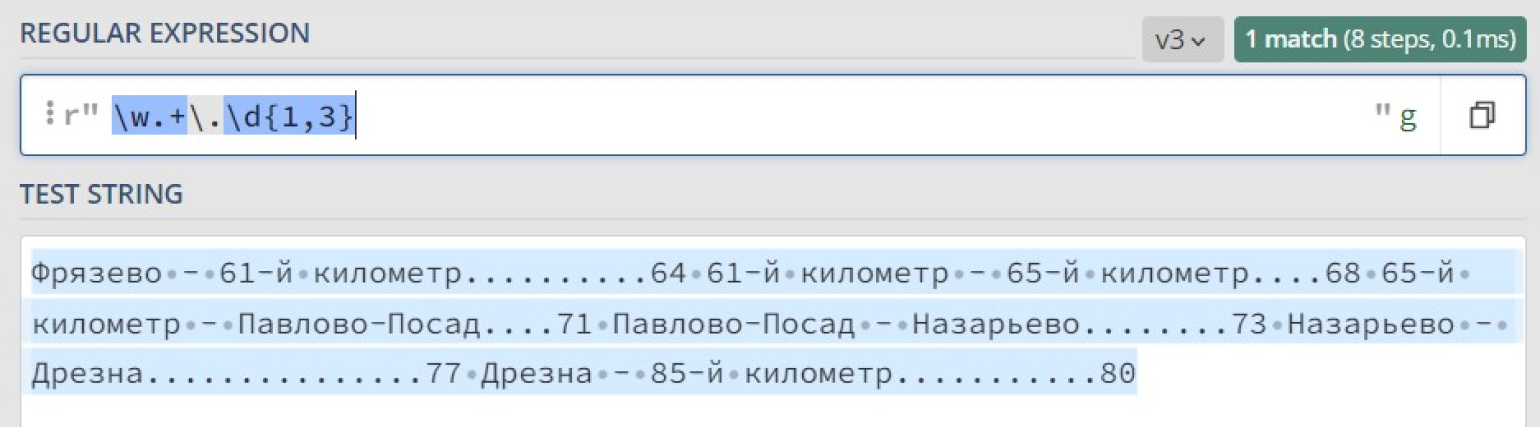
Что же произошло? Почему найдено только одно совпадение, причем за него посчитали весь текст сразу? Всё дело в жадности квантификатора +, который старается захватить максимально возможное количество подходящих символов.
В итоге шаблон w находит совпадение с буквой «Ф» в начале текста, шаблон .d{1,3} находит совпадение с «.80» в конце текста, а всё, что между ними, покрывается шаблоном .+.
Чтобы квантификатор захватывал минимально возможное количество символов, его нужно сделать ленивым. В таком случае каждый раз, находя совпадение с шаблоном ., регулярное выражение будет спрашивать: «Подходят ли следующие символы в строке под оставшуюся часть шаблона?»
Если нет, то функция будет искать следующее совпадение с .. А если да, то . закончит свою работу и следующие символы строки будут сравниваться со следующей частью регулярного выражения: .d{1,3}.
Чтобы объявить квантификатор ленивым, после него надо поставить символ ?. Сделаем ленивым квантификатор + в нашем регулярном выражении для поиска строк в оглавлении:
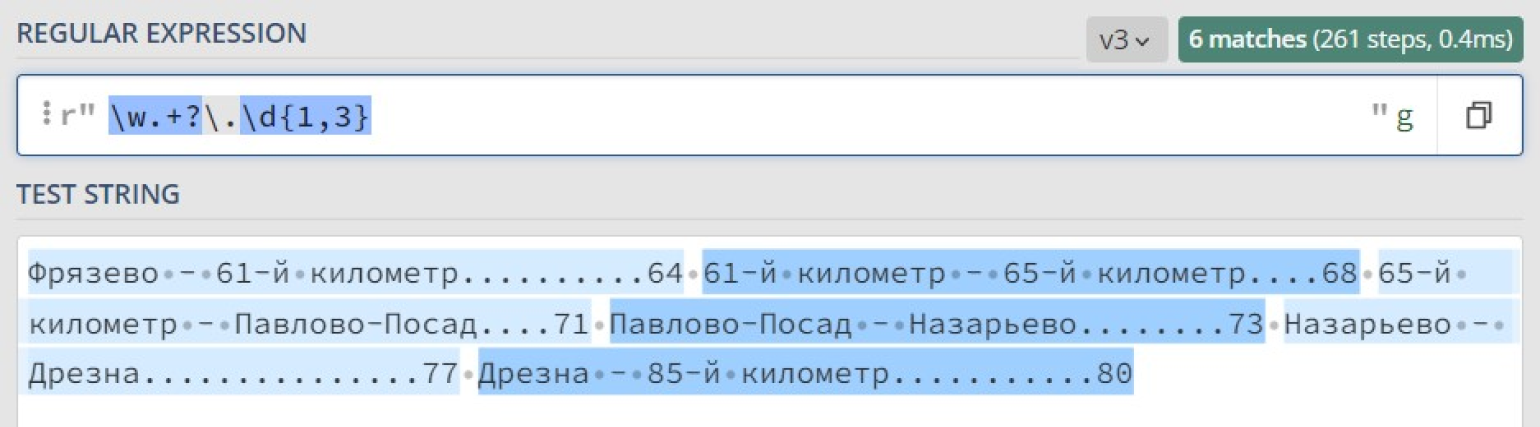
Теперь, когда мы уверены в правильности работы нашего регулярного выражения, используем функцию re.findall, чтобы выписать оглавление построчно:
content = 'Фрязево — 61-й километр..........64 61-й километр — 65-й километр....68 65-й километр — Павлово-Посад....71 Павлово-Посад — Назарьево........73 Назарьево — Дрезна...............77 Дрезна — 85-й километр...........80'

strings = re.findall (r'w.+?.d{1,3}', content)
for string in strings:
    print (string)

#Результат на экране.
>>> Фрязево — 61-й километр..........64
>>> 61-й километр — 65-й километр....68
>>> 65-й километр — Павлово-Посад....71
>>> Павлово-Посад — Назарьево........73
>>> Назарьево — Дрезна...............77
>>> Дрезна — 85-й километр...........80
В некоторых случаях одну и ту же задачу можно решить разными способами, используя разные возможности регулярок. Попробуйте решить следующие задачи самостоятельно. Возможно, у вас даже получится сделать это более эффективно.
При обнародовании судебных решений из них извлекают персональные данные участников процесса — фамилии, имена и отчества. Каждое слово в Ф. И. О. начинается с заглавной буквы, при этом фамилия может быть двойная.
Напишите программу, которая заменит в тексте Ф. И. О. подсудимого на N.
Подсудимая Эверт-Колокольцева Елизавета Александровна в судебном заседании вину инкриминируемого правонарушения признала в полном объёме и суду показала, что 14 сентября 1876 года, будучи в состоянии алкогольного опьянения от безысходности, в связи с состоянием здоровья позвонила со своего стационарного телефона в полицию, сообщив о том, что у неё в квартире якобы заложена бомба. После чего приехали сотрудники полиции, скорая и пожарные, которым она сообщила, что бомба — это она.
«Подсудимая N в судебном заседании» и далее по тексту.
Подсказка
Используйте незапоминаемую опциональную группу вида (? : …)? , чтобы обозначить вторую часть фамилии после дефиса.
Решение
#Сначала кладём в переменную string текст строки, по которой ведём поиск.
print (re.sub (r'[А-ЯЁ]w*'
          r'(?:-[А-ЯЁ]w*)?'
          r'(?: [А-ЯЁ]w*){2}', 'N', string))
Большинство адресов состоит из трёх частей: название улицы, номер дома и номер квартиры. Название улицы может состоять из нескольких слов, каждое из которых пишется с заглавной буквы. Номер дома может содержать после себя букву.
Перед названием улицы может быть написано «Улица», «улица», «Ул.» или «ул.», перед номером дома — «дом» или «д.», перед номером квартиры — «квартира» или «кв.». Также номер дома и номер квартиры могут быть разделены дефисом без пробелов.
Дан текст, в нём нужно найти все адреса и вывести их в виде «Пушкина 32-135».
Для упрощения мы не будем учитывать дома, которые находятся не на улицах, а на площадях, набережных, бульварах и так далее.
Добрый день!
Сегодня на выезды потребуется отправить трёх-четырёх специалистов, остальных держите в офисе. Некоторые заявки пришли на конкретных людей, но можно вызвать и других, смотрите по ситуации, как лучше их отправить, чтобы всех объездить сегодня.
Петрову П. П. попросили выехать по адресам ул. Культуры 78 кв. 6, улица Мира дом 12Б квартира 144. Смирнова С. С. просят подъехать только по адресу: Восьмого Марта 106-19. Без предпочтений по специалистам пришли запросы с адресов: улица Свободы 54 6, Улица Шишкина дом 9 кв. 15, ул. Лермонтова 18 кв. 93.
Все адреса скопированы из заявок, корректность подтверждена.
Культуры 78-6
Мира 12Б-144
Восьмого Марта 106-19
Свободы 54-6
Шишкина 9-15
Лермонтова 18-93
Подсказка
Используйте деление на группы, чтобы удобно выстроить структуру выражения. Попросите regex запоминать только нужные вам части адреса, чтобы функция не возвращала вам лишние подгруппы.
Решение
#Сначала кладём в переменную string текст строки, по которой ведём поиск.
pattern = re.compile (r'(?:[Уу]л(?:.|ица) )?'
                      r'((?:[А-ЯЁ]w+)(?: [А-ЯЁ]w+)*)'
                      r' (?:дом |д. )?'
                      r'(d+w?)'
                      r'[ -](?:квартира |кв. )?'
                      r'(d+)')

addresses = pattern.findall (text)
for address in addresses:
    print (f'{address[0]} {address[1]}-{address[2]}')
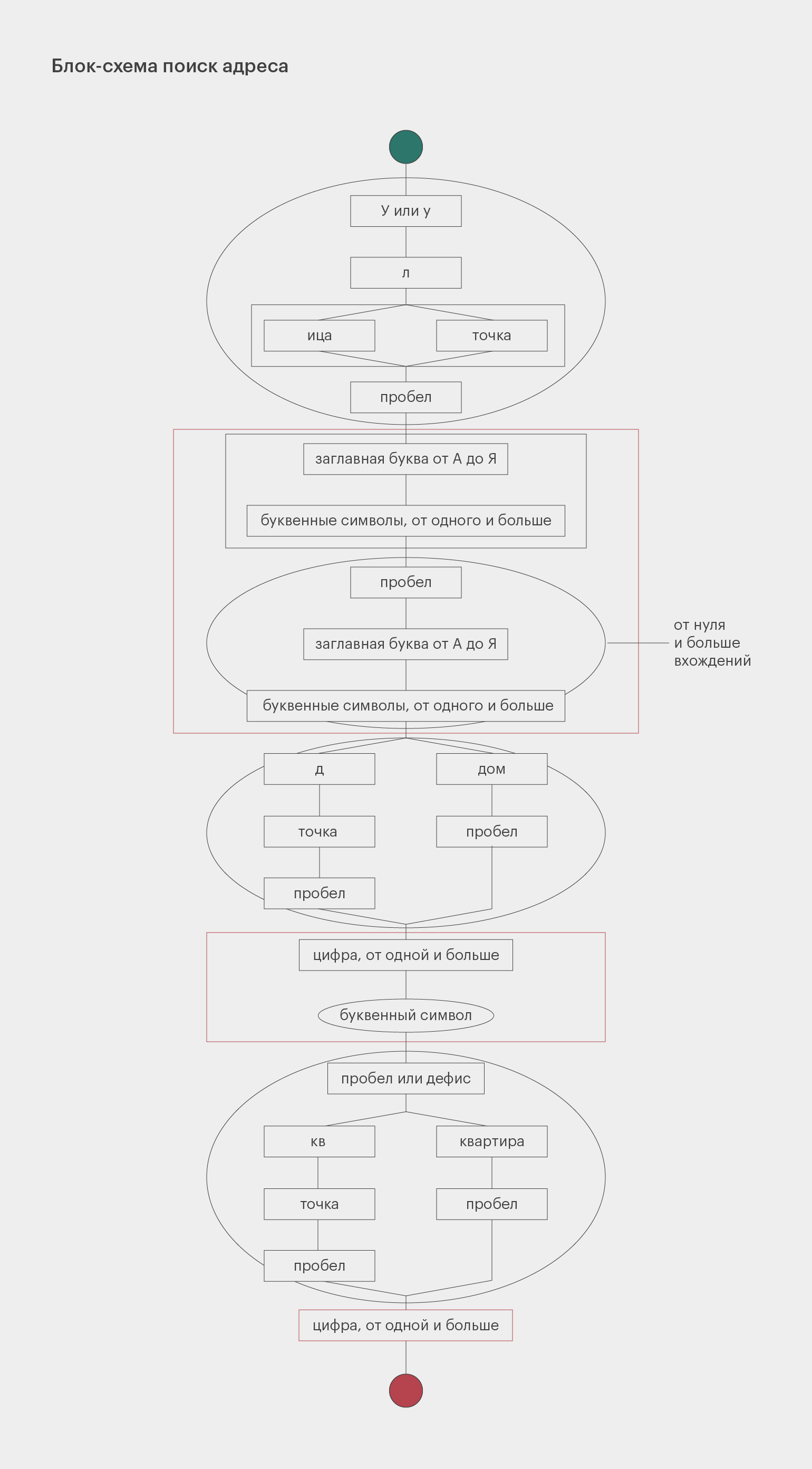
Структура этого регулярного выражения довольно сложная. Чтобы в нём разобраться, посмотрите на схему. Прямоугольники обозначают обязательные элементы, овалы — опциональные. Развилки символизируют разные варианты, которые допускает наш шаблон. Красным цветом очерчены группы, которые мы запоминаем.
Писатели в поиске собственного неповторимого стиля нередко изобретают оригинальные творческие приёмы и неукоснительно им следуют. Например, Сергей Довлатов следил за тем, чтобы слова в предложении не начинались с одной и той же буквы.
Даны несколько предложений. Программа должна проверить, встречаются ли в каждом из них слова на одинаковую букву. Если таких нет, она печатает: «Метод Довлатова соблюдён». А если есть: «Вы расстроили Сергея Донатовича».
Важно. Чтобы регулярные выражения не рассматривали заглавные и прописные буквы как разные символы, передайте re-функции дополнительный аргумент flags=re.I или flags=re.IGNORECASE.
Здесь все слова начинаются с разных букв.
А в этом предложении есть слова, которые всё-таки начинаются на одну и ту же букву.
А здесь совсем интересно: символ «а» однобуквенный.
Метод Довлатова соблюдён
Вы расстроили Сергея Донатовича
Вы расстроили Сергея Донатовича
Подсказка
Чтобы указать на начало слова, используйте символ b.
Чтобы в каждом совпадении regex не старалось захватить максимум, используйте ленивый пропуск.
Чтобы найти повторяющийся символ, используйте ссылку на группу в виде 1.
Решение
#Сначала кладём в переменную string текст строки, по которой ведём поиск.
pattern = r'b(w)w*.*?b1'

match = re.search (pattern, string, flags=re.I)
if match is None:
    print ('Метод Довлатова соблюдён')
else:
    print ('Вы расстроили Сергея Донатовича')
Вернёмся к регулярному выражению, которое ищет даты в учебнике истории: (? :d{4})|(? : [IVX]+ век).
Оно в целом справляется со своей задачей, но также находит много ненужных чисел. Например, количество человек, которые участвовали в битве, тоже может быть описано четырьмя цифрами подряд.
Чтобы не получать лишние результаты, обратим внимание на то, как именно могут быть записаны годы. Есть несколько вариантов записи: 1400 год, 1400 г., 1400–1500 годы, 1400–1500 гг., (1400), (1400–1500).
Чтобы немного упростить задачу и не раздувать регулярное выражение, мы не будем искать конструкции «с такого-то по такой-то год» и «между таким-то и таким-то годом».
Важное замечание. Не забывайте про экранирование, если хотите использовать точки и скобки в качестве обычных, а не специальных символов. Так программа правильно поймёт, что вы имеете в виду.
Началом Реформации принято считать 31 октября 1517 г. — день, когда Мартин Лютер (1483–1546) прибил к дверям виттенбергской Замковой церкви свои «95 тезисов», в которых выступил против злоупотреблений Католической церкви. Реформация охватила практически всю Европу и продолжалась в течение всего XVI века и первой половины XVII века. Одно из самых известных и кровавых событий Реформации — Варфоломеевская ночь во Франции, произошедшая в ночь на 24 августа 1572 года.
Точное число жертв так и не удалось установить достоверно. Погибли по меньшей мере 2000 гугенотов в Париже и 3000 — в провинциях. Герцог де Сюлли, сам едва избежавший смерти во время резни, говорил о 70 000 жертв. Для Парижа единственным точным числом остаётся 1100 погибших во время Варфоломеевской ночи.
Этому событию предшествовали три других, произошедшие в 1570–1572 годах: Сен-Жерменский мирный договор (1570), свадьба гугенота Генриха Наваррского и Маргариты Валуа (1572) и неудавшееся покушение на убийство адмирала Колиньи (1572).
[‘1517 г.’, ‘(1483–1546)’, ‘XVI век’, ‘XVII век’, ‘1572 год’, ‘1570–1572 годах’, ‘(1570)’, ‘(1572)’, ‘(1572)’]
Решение
#Сначала кладём в переменную string текст строки, по которой ведём поиск.
pattern = re.compile (r'(?:(d{4}(?:-d{4})?))'
                      r'|'
                      r'(?:'
                          r'(?:d{4}-)?d{4} '
                          r'(?:'
                              r'(?:год(?:ы|ах|ов)?)'
                              r'|'
                              r'(?:гг?.)'
                          r')'
                      r')'
                      r'|'
                      r'(?:[IVX]+ век)')

print (pattern.findall (string))
Если вам сложно разобраться в структуре этого выражения, то вот его схема:
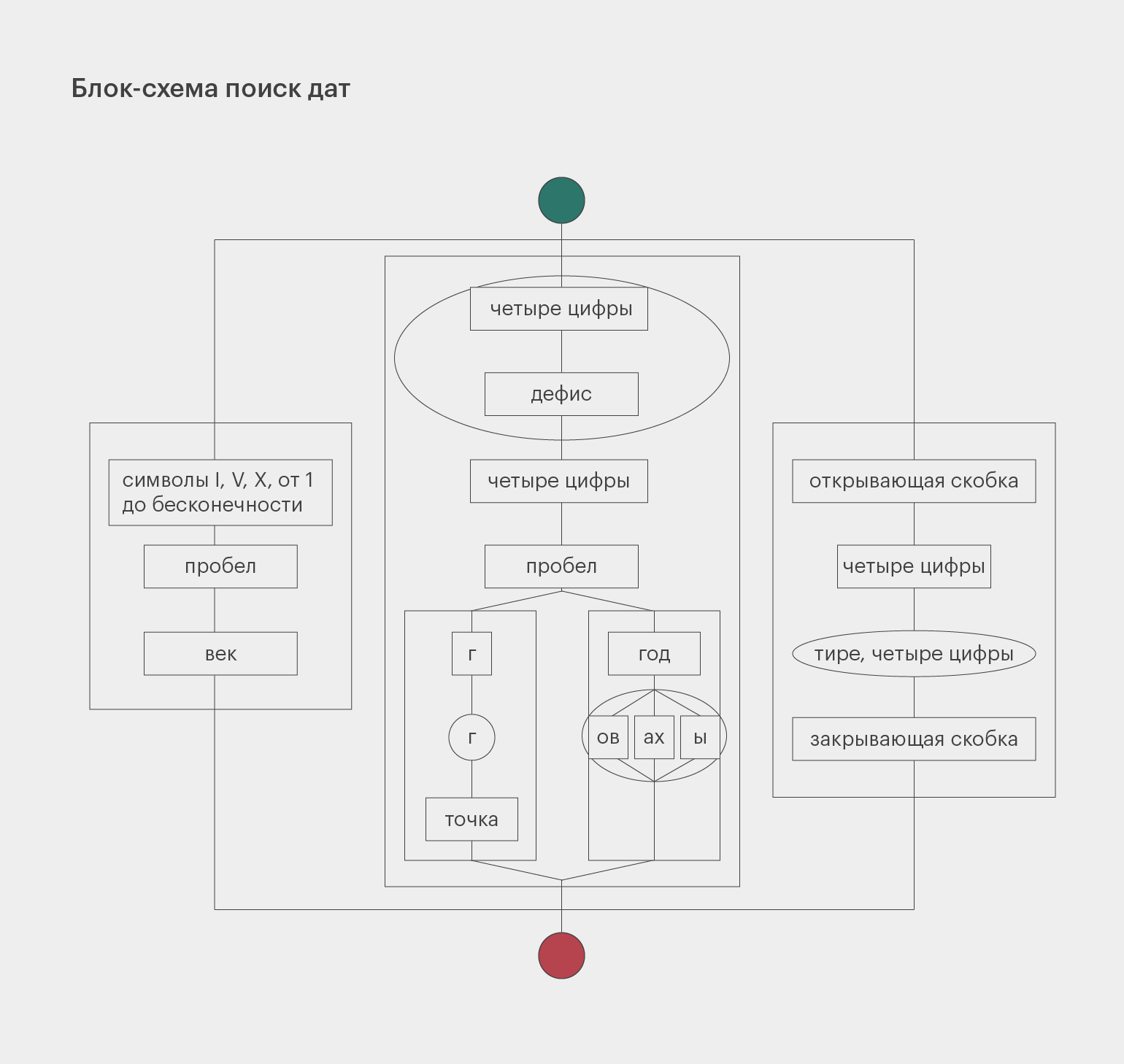

Научитесь: Профессия Python-разработчик
Узнать больше